Rootstock is natively supported by [LI.FI](https://li.fi), a cross-chain liquidity aggregator. LI.FI routes swaps and bridges across dozens of chains and protocols, including Hop, Stargate, Across, and Gas.zip. It delivers the specific destination token your users select (for example, bridged USDC on Rootstock), straight to Rootstock, in a single transaction.
This guide covers three integration paths:
1. **LI.FI Widget** - embed a pre-configured, customizable UI component
2. **`@lifi/sdk`** - fetch quotes and execute routes programmatically
3. **`getContractCallsQuote`** (Advanced) - bridge assets and call a Rootstock contract atomically in one user click
## Prerequisites
- Node.js 18+
- A Next.js or React project
- Basic familiarity with `viem` and EVM wallets
- LI.FI API access (no API key required for basic rate limits; register at [portal.li.fi](https://portal.li.fi/signup) for higher limits)
:::info[Note on Rootstock Assets]
Rootstock does not have native USDC issued by Circle. USDC on Rootstock is bridged from other networks via protocols such as [LayerZero](/use-cases/interoperability/rootstock-layerzero/) or Stargate. Always verify the exact contract address of the bridged asset you wish to interact with on Rootstock before deploying.
:::
## Integration 1: The LI.FI Widget
The [LI.FI](https://li.fi/widget/) Widget is a self-contained React component. Lock the destination chain to Rootstock so users always land on Chain ID 30. The widget handles wallet connection, route selection, approvals, and transaction execution automatically.
### Set Up a Project
Before installing the widget, you need a Next.js or React project with a configured wallet provider. If you do not already have one, start from a Rootstock quick start such as the [Rootstock Dynamic starter kit](https://github.com/rsksmart/rootstock-dynamic), which ships with Wagmi, viem, and wallet connection wired up out of the box.
### Install
```bash
npm install @lifi/widget @lifi/wallet-management
```
### Embed and Configure
```tsx
// app/bridge/page.tsx
"use client";
// Lock the destination to Rootstock (Chain ID 30)
// and pre-fill a default destination token (bridged USDC on Rootstock)
const widgetConfig: WidgetConfig = {
toChain: 30,
// Replace with the exact bridged USDC address your dApp uses on Rootstock
toToken: "0x74C9F2B00581F1b11Aa7Ff05aa9f608B7389de67",
appearance: "light",
theme: {
palette: {
primary: { main: "#FF6B00" },
},
container: {
border: "1px solid rgb(234, 234, 234)",
borderRadius: "16px",
},
},
// Hide the destination chain selector so users cannot change the target chain
hiddenUI: ["toChain"],
// Replace with your integrator identifier for analytics (max 23 chars, alphanumeric)
integrator: "my-rootstock-dapp",
};
export default function BridgePage() {
return (
);
}
```
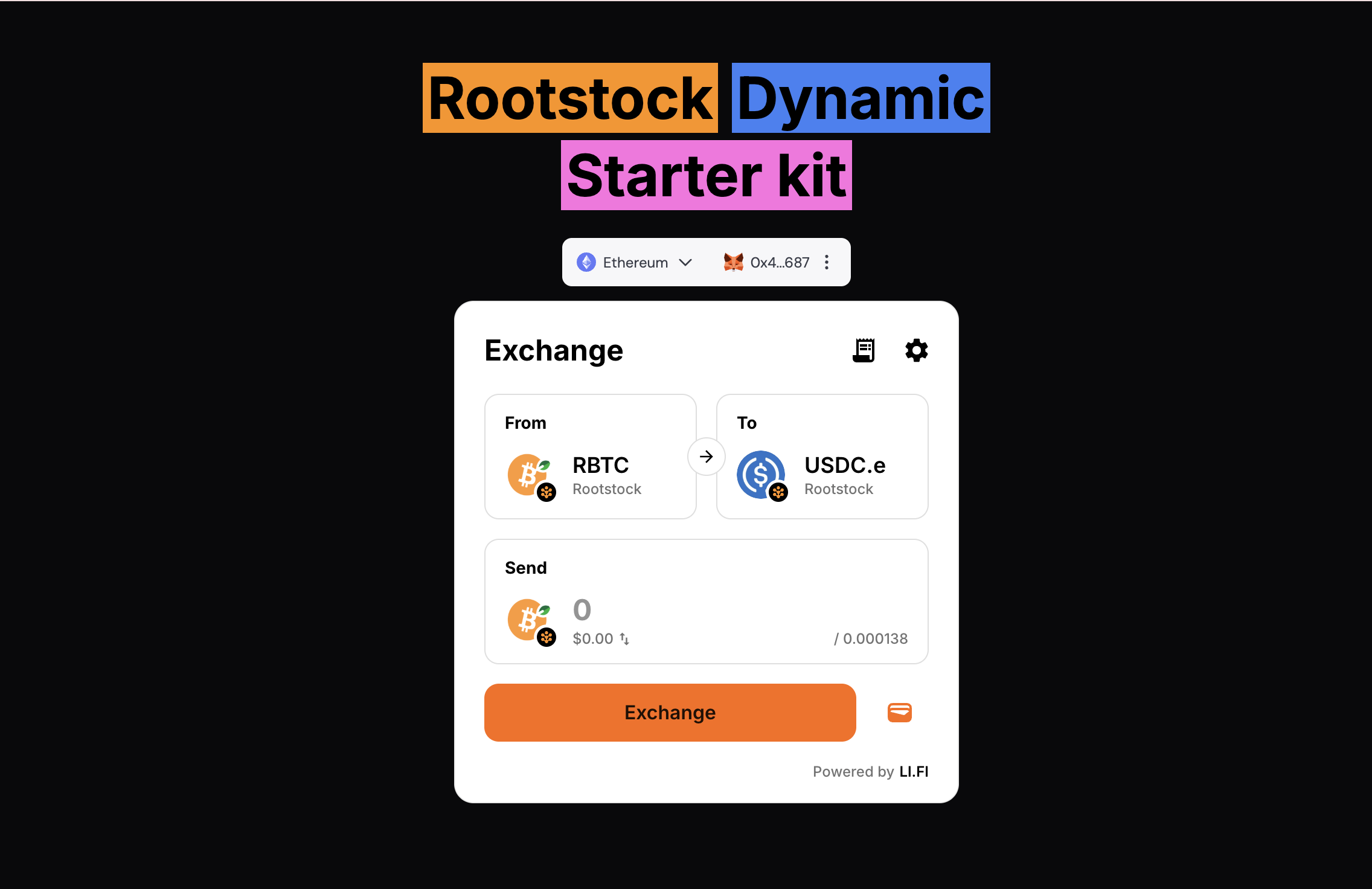
Once rendered, the widget appears as a self-contained bridge UI in your app:
:::tip[Using Your Own Wallet Provider]
If your dApp already uses Wagmi, wrap the widget inside your `WagmiProvider`. The widget detects the existing context and reuses your wallet setup automatically, with no extra configuration required.
:::
Users pick a source chain and token, and the widget routes everything to Rootstock. Visit the [LI.FI Playground](https://playground.li.fi) to preview customization options before shipping.
## Integration 2: The `@lifi/sdk`
Use the SDK when you need programmatic control over quotes, route selection, or execution. This is the right path for custom swap UIs or automated liquidity flows.
### Install
```bash
npm install @lifi/sdk viem
```
### Configure the EVM Provider
The SDK v3 is function-based and requires a one-time setup with an EVM provider before you can execute any routes. Call `createConfig` once at app startup.
```ts
// lib/lifi-config.ts
// Initialize the SDK once at app startup
// Pass your Wagmi config so the SDK can sign and submit transactions
createConfig({
integrator: "my-rootstock-dapp",
providers: [
EVM({
getWalletClient: () => getWalletClient(wagmiConfig),
switchChain: async (chainId) => {
const chain = await switchChain(wagmiConfig, { chainId });
return getWalletClient(wagmiConfig, { chainId: chain.id });
},
}),
],
// Recommended: provide authenticated RPC URLs in production to avoid public rate limits
rpcUrls: {
// Example: point the SDK at a dedicated Rootstock RPC endpoint
// 30: ["https://public-node.rsk.co"],
},
});
```
### Fetch a Quote and Execute
```ts
// lib/lifi-bridge.ts
// Import the config initializer to guarantee it runs before any SDK call
import "./lifi-config";
export async function bridgeUsdcToRootstock(userAddress: `0x${string}`) {
// Native USDC contract on Arbitrum
const ARBITRUM_USDC = "0xaf88d065e77c8cC2239327C5EDb3A432268e5831";
// Bridged USDC address on Rootstock - verify against the Rootstock token registry
const ROOTSTOCK_USDC = "0x74C9F2B00581F1b11Aa7Ff05aa9f608B7389de67";
// Request the single best quote for 100 USDC from Arbitrum to Rootstock
const quote = await getQuote({
fromChain: 42161,
toChain: 30,
fromToken: ARBITRUM_USDC,
toToken: ROOTSTOCK_USDC,
// Amount in the token's smallest unit: 100 USDC at 6 decimals
fromAmount: "100000000",
fromAddress: userAddress,
});
// executeRoute manages approvals, chain switching, and transaction submission
const result = await executeRoute(quote, {
// updateRouteHook fires whenever the route object receives a status update
updateRouteHook(updatedRoute) {
console.log("Bridge status:", updatedRoute.steps[0].execution?.status);
},
// acceptExchangeRateUpdateHook is called if the rate changes mid-execution
// Return true to continue or false to abort
acceptExchangeRateUpdateHook: async () => true,
});
return result;
}
```
:::warning[Exchange Rate Changes]
Always implement `acceptExchangeRateUpdateHook` in production. Without it, routes where the exchange rate shifts during execution abort silently.
:::
## Integration 3: Advanced Destination Calls via the Composer
This integration uses `getContractCallsQuote` from the SDK v3. It bridges tokens from another chain and, in the same atomic user action, calls a function on a Rootstock contract on arrival. The user signs one transaction on Arbitrum and ends up with yield-bearing positions on Rootstock.
### How It Works
1. The user signs one transaction on the source chain (e.g., Arbitrum).
2. LI.FI bridges USDC to Rootstock.
3. The LI.FI Composer calls your Rootstock contract with the bridged funds on arrival.
4. Your contract deposits the funds into a yield protocol on behalf of the user.
### Step 1: Write the Rootstock Receiver Contract
Deploy a contract that accepts the bridged token and executes your protocol logic. The LI.FI Composer transfers the token to your contract and then calls your function.
```solidity
// SPDX-License-Identifier: MIT
pragma solidity ^0.8.20;
import "@openzeppelin/contracts/token/ERC20/IERC20.sol";
// IYieldProtocol is a placeholder for any Rootstock yield vault interface
interface IYieldProtocol {
function deposit(uint256 amount, address receiver) external returns (uint256 shares);
}
contract RootstockYieldReceiver {
// The LI.FI Diamond address on Rootstock, used to authorize incoming Composer calls
// Read this from the quote response transactionRequest.to field at deploy time
// Do NOT hardcode this across different networks - the address varies per chain
address public immutable lifiDiamond;
// The yield vault that accepts USDC deposits on Rootstock
IYieldProtocol public immutable yieldVault;
// Emit an event so frontends can track successful deposits
event Deposited(address indexed user, uint256 amount, uint256 shares);
error UnauthorizedCaller(address caller);
constructor(address _lifiDiamond, address _yieldVault) {
lifiDiamond = _lifiDiamond;
yieldVault = IYieldProtocol(_yieldVault);
}
// LI.FI Composer calls this function after bridging tokens to this contract
// token - the bridged token address (bridged USDC on Rootstock)
// amount - the amount received after bridging fees
// recipient - the original user address passed in from the source chain
function swapAndDeposit(
address token,
uint256 amount,
address recipient
) external {
// Restrict calls to the LI.FI Diamond only
if (msg.sender != lifiDiamond) {
revert UnauthorizedCaller(msg.sender);
}
// Pull the bridged tokens from the Composer into this contract
IERC20(token).transferFrom(msg.sender, address(this), amount);
// Approve the yield vault to spend the bridged tokens
IERC20(token).approve(address(yieldVault), amount);
// Deposit into the vault and credit the yield shares to the original user
uint256 shares = yieldVault.deposit(amount, recipient);
emit Deposited(recipient, amount, shares);
}
}
```
:::warning[Security Notice]
Always restrict who can call your receiver function. Validate `msg.sender` against the LI.FI Diamond address as shown above. The Diamond address varies per chain. Fetch it from the quote response `transactionRequest.to` field and set it at constructor time for the target network.
:::
Deploy `RootstockYieldReceiver` to Rootstock mainnet (Chain ID 30) and note the contract address.
### Step 2: Call from the Frontend with `getContractCallsQuote`
```ts
// lib/bridge-and-deposit.ts
createConfig({
integrator: "my-rootstock-dapp",
providers: [
EVM({
getWalletClient: () => getWalletClient(wagmiConfig),
switchChain: async (chainId) => {
const chain = await switchChain(wagmiConfig, { chainId });
return getWalletClient(wagmiConfig, { chainId: chain.id });
},
}),
],
});
// ABI fragment for the swapAndDeposit function on RootstockYieldReceiver
const receiverAbi = [
{
name: "swapAndDeposit",
type: "function",
inputs: [
{ name: "token", type: "address" },
{ name: "amount", type: "uint256" },
{ name: "recipient", type: "address" },
],
},
] as const;
export async function bridgeAndDeposit(userAddress: `0x${string}`) {
// Native USDC on Arbitrum
const ARBITRUM_USDC = "0xaf88d065e77c8cC2239327C5EDb3A432268e5831";
// Bridged USDC on Rootstock - verify against the Rootstock token registry
const ROOTSTOCK_USDC = "0x74C9F2B00581F1b11Aa7Ff05aa9f608B7389de67";
// Address of your deployed RootstockYieldReceiver on Rootstock mainnet
const RECEIVER_CONTRACT = "0xYourDeployedReceiverAddress";
// 100 USDC expressed in 6-decimal units
const FROM_AMOUNT = "100000000";
// Encode the destination calldata for swapAndDeposit
// Pass 0n as the amount placeholder. The LI.FI Composer replaces it with the actual bridged amount at execution time.
const destinationCalldata = encodeFunctionData({
abi: receiverAbi,
functionName: "swapAndDeposit",
args: [ROOTSTOCK_USDC, 0n, userAddress],
});
// getContractCallsQuote requests a bridging route that includes a destination contract call
const contractCallQuote = await getContractCallsQuote({
fromChain: 42161,
toChain: 30,
fromToken: ARBITRUM_USDC,
toToken: ROOTSTOCK_USDC,
fromAmount: FROM_AMOUNT,
fromAddress: userAddress,
// contractCalls defines what executes on Rootstock after the bridge settles
contractCalls: [
{
fromAmount: FROM_AMOUNT,
fromTokenAddress: ROOTSTOCK_USDC,
toContractAddress: RECEIVER_CONTRACT,
toContractCallData: destinationCalldata,
// Gas budget for the destination call on Rootstock
toContractGasLimit: "300000",
// The address that must receive token approval before the call runs
toApprovalAddress: RECEIVER_CONTRACT,
},
],
});
const result = await executeRoute(contractCallQuote, {
updateRouteHook(updatedRoute) {
console.log("Bridge status:", updatedRoute.steps[0].execution?.status);
},
acceptExchangeRateUpdateHook: async () => true,
});
return result;
}
```
### Step 3: Wire It to a React Button
```tsx
// components/BridgeAndDepositButton.tsx
"use client";
export function BridgeAndDepositButton() {
const { address, isConnected } = useAccount();
const [status, setStatus] = useState("");
const [isPending, setIsPending] = useState(false);
async function handleClick() {
if (!address) return;
setIsPending(true);
setStatus("Fetching best route...");
try {
await bridgeAndDeposit(address);
setStatus("Success. Funds deposited into the Rootstock yield vault.");
} catch (err) {
setStatus("Transaction failed. Check the browser console for details.");
console.error(err);
} finally {
setIsPending(false);
}
}
return (
{status &&
{status}
}
);
}
```
The user connects on Arbitrum, clicks the button, approves one transaction, and their funds arrive deposited into the Rootstock yield vault. No manual bridging. No second transaction.
## Troubleshooting
**"No routes found" from `getQuote`**
Check that both token addresses are correct and that `fromAmount` is above the minimum for the selected bridge. Use the [LI.FI Explorer](https://explorer.li.fi) to inspect available routes between your chosen chains and tokens.
**`executeRoute` hangs at approval**
Ensure your EVM provider is configured with `getWalletClient` and `switchChain` before calling any execute function. Without a provider, the SDK fetches quotes but cannot sign transactions.
**Destination contract not called after bridge**
Confirm that `toApprovalAddress` in `contractCalls` matches the address that calls `transferFrom` in your contract. A mismatch causes the token pull to fail and the call to revert silently on arrival.
**`msg.sender` validation fails in the receiver contract**
The LI.FI Diamond address differs per chain. Read the `transactionRequest.to` field from the quote response to get the correct Rootstock address, and set it as `lifiDiamond` in your constructor at deploy time.
## Reference
| Parameter | Value |
|---|---|
| Rootstock Chain ID (mainnet) | `30` |
| Rootstock Chain ID (testnet) | `31` |
| Native gas token | `rBTC` |
| LI.FI API base URL | `https://li.quest/v1` |
| LI.FI Widget package | `@lifi/widget` |
| LI.FI SDK package | `@lifi/sdk` |
| LI.FI partner portal | [portal.li.fi](https://portal.li.fi/signup) |
| LI.FI route explorer | [explorer.li.fi](https://explorer.li.fi) |
| LI.FI widget playground | [playground.li.fi](https://playground.li.fi) |
## Next Steps
- Explore the [LI.FI API reference](https://docs.li.fi/api-reference/introduction) to filter routes by bridge, fee, or speed.
- Review the [Atlas FAQ](https://dev.rootstock.io/resources/guides/atlas/faq/) for canonical bridged token addresses on Rootstock.
- Test on Rootstock Testnet (Chain ID: 31) before deploying to mainnet.
- Read the [LI.FI SDK v2 to v3 migration guide](https://docs.li.fi/sdk/migrate-v2-to-v3) if you are upgrading an existing integration.
- Register your integrator name at the [LI.FI partner portal](https://portal.li.fi/signup) to unlock higher API rate limits and transaction analytics.