> For the complete documentation index, see [llms.txt](/ja/llms.txt).

This guide walks you through building a React dApp that integrates with the **Rootstock Name Service (RNS)** using the `@rsksmart/rns-sdk`. You'll create a functional application that allows users to:

- Resolve domain names to addresses
- Check domain availability
- Check subdomain availability
- Get domain owner information
- Get resolver contract addresses

By the end of this guide, you'll have a working dApp that demonstrates core RNS operations using the official SDK.

## Prerequisites

Before starting, ensure you have the following:

- [Node.js](https://nodejs.org/en/download) and [npm](https://docs.npmjs.com/downloading-and-installing-node-js-and-npm/) installed
- Basic understanding of React and JavaScript
- Familiarity with blockchain concepts

:::note
All code snippets in this guide will be added inside your `App.js` file.
:::

## 1. Project Setup

a. Create a new React app and navigate to the project directory:

```bash
npx create-react-app rns-dapp
cd rns-dapp
```

b. Install the required dependencies:

```bash
npm install @rsksmart/rns-sdk @ethersproject/providers ethers react-dom react-scripts 

npm install -D buffer
```

After installation, your `package.json` should include these dependencies (versions may vary based on the latest releases):

```json
{
  "dependencies": {
    "@rsksmart/rns-sdk": "^1.0.0",
    "@ethersproject/providers": "^5.7.2",
    "ethers": "^5.7.2",
    "react": "^18.2.0",
    "react-dom": "^18.2.0",
    "react-scripts": "^5.0.1"
  }
},

"devDependencies": {
    "buffer": "^6.0.3"
  },
```

c. Go to `index.js` and change it to the following code:

```js
import React from 'react';
import { createRoot } from 'react-dom/client';
import App from './App';
import './index.css';

// Polyfill Buffer for browser environment
window.Buffer = window.Buffer || require('buffer').Buffer;

const root = createRoot(document.getElementById('root'));
root.render(<App />);
```

## 2. Import Required Modules

Open your `App.js` file and add the following imports:

```js
import React, { useState, useCallback, useMemo } from "react";
import { JsonRpcProvider } from "@ethersproject/providers";
import { RNS, AddrResolver, RSKRegistrar } from "@rsksmart/rns-sdk";
```

**What each import does:**

| Import                                  | Purpose                                         |
| --------------------------------------- | ----------------------------------------------- |
| `React, useState, useCallback, useMemo` | React hooks for state management                |
| `JsonRpcProvider`                       | Connect to RSK network via RPC                  |
| `RNS`                                   | Domain management (owner, resolver, subdomains) |
| `AddrResolver`                          | Resolve domains to addresses                    |
| `RSKRegistrar`                          | Check domain availability                       |

## 3. Configure Network and Contract Addresses

Add the configuration for connecting to Rootstock Testnet:

```js
const ROOTSTOCK_RPC_NODE = 'https://rpc.testnet.rootstock.io/${APIKEY}';

// Contract addresses for Rootstock Testnet
// See: https://github.com/rsksmart/rns-sdk
const ADDRESSES = {
  // RNS Registry (testnet)
  registry: "0x7d284aaac6e925aad802a53c0c69efe3764597b8",
  // RSK Owner - ERC-721 .rsk domains token (testnet)
  rskOwner: "0xca0a477e19bac7e0e172ccfd2e3c28a7200bdb71",
  // FIFS Addr Registrar - .rsk domains registrar (testnet)
  fifsAddrRegistrar: "0x90734bd6bf96250a7b262e2bc34284b0d47c1e8d",
  // RIF Token (testnet)
  rifToken: "0x19f64674d8a5b4e652319f5e239efd3bc969a1fe",
};
```

For Mainnet, use the following addresses instead:

| Contract            | Mainnet Address                            |
| ------------------- | ------------------------------------------ |
| Registry            | 0xcb868aeabd31e2b66f74e9a55cf064abb31a4ad5 |
| RSK Owner           | 0x45d3e4fb311982a06ba52359d44cb4f5980e0ef1 |
| FIFS Addr Registrar | 0xd9c79ced86ecf49f5e4a973594634c83197c35ab |
| RIF Token           | 0x2acc95758f8b5f583470ba265eb685a8f45fc9d5 |

## 4. Initialize the Provider

Create a JSON-RPC provider to connect to the Rootstock network:

```js
const provider = new JsonRpcProvider(ROOTSTOCK_RPC_NODE);
```

## 5. Add UI Styles

Add styling for the application interface:

```js
const styles = {
  container: {
    minHeight: "100vh",
    backgroundColor: "#f5f6fa",
    display: "flex",
    justifyContent: "center",
    alignItems: "center",
    padding: "20px",
    fontFamily: "Arial, sans-serif",
  },
  card: {
    backgroundColor: "#fff",
    padding: "25px",
    borderRadius: "10px",
    maxWidth: "520px",
    width: "100%",
    boxShadow: "0 2px 6px rgba(0,0,0,0.1)",
  },
  heading: {
    textAlign: "center",
    marginBottom: "20px",
    fontSize: "22px",
  },
  input: {
    padding: "10px",
    width: "100%",
    borderRadius: "6px",
    border: "1px solid #ccc",
    marginBottom: "10px",
    boxSizing: "border-box",
  },
  buttonGroup: {
    display: "flex",
    gap: "10px",
    marginBottom: "10px",
  },
  button: {
    flex: 1,
    padding: "10px",
    backgroundColor: "#388e3c",
    color: "#fff",
    border: "none",
    borderRadius: "6px",
    cursor: "pointer",
  },
  buttonAlt: {
    flex: 1,
    padding: "10px",
    backgroundColor: "#1976d2",
    color: "#fff",
    border: "none",
    borderRadius: "6px",
    cursor: "pointer",
  },
  buttonWide: {
    width: "100%",
    padding: "10px",
    backgroundColor: "#5e35b1",
    color: "#fff",
    border: "none",
    borderRadius: "6px",
    marginTop: "10px",
    marginBottom: "5px",
    cursor: "pointer",
  },
  ownerBox: {
    padding: "10px",
    backgroundColor: "#e8f5e9",
    borderRadius: "6px",
    border: "1px solid #c8e6c9",
    marginTop: "10px",
  },
  divider: {
    margin: "20px 0",
    borderTop: "1px solid #ddd",
  },
  resultBox: {
    marginTop: "10px",
    padding: "10px",
    backgroundColor: "#f9f9f9",
    border: "1px solid #ddd",
    borderRadius: "6px",
  },
};
```

## 6. Create the RNS Custom Hook

The custom hook `useRns` encapsulates all RNS SDK operations:

```js
const useRns = () => {
  // Initialize SDK instances
  // For read-only operations, we pass the provider
  // For write operations, you'd need a proper Signer
  
  const rns = useMemo(() => new RNS(ADDRESSES.registry, provider), []);

  const addrResolver = useMemo(
    () => new AddrResolver(ADDRESSES.registry, provider),
    []
  );

  const rskRegistrar = useMemo(
    () =>
      new RSKRegistrar(
        ADDRESSES.rskOwner,
        ADDRESSES.fifsAddrRegistrar,
        ADDRESSES.rifToken,
        provider
      ),
    []
  );
```

### a. Get RSK address Using `AddrResolver` for a domain

```js
  const getAddressByRns = useCallback(
    async (domain) => {
      try {
        const address = await addrResolver.addr(domain);
        if (
          !address ||
          address === "0x0000000000000000000000000000000000000000"
        ) {
          return null;
        }
        return address.toLowerCase();
      } catch (e) {
        console.error("getAddressByRns error:", e);
        return null;
      }
    },
    [addrResolver]
  );
```

### b. Get a domain resolver contract address

```js
 const getResolverAddress = useCallback(
   async (domain) => {
     try {
       const resolverAddr = await rns.getResolver(domain);
       return resolverAddr;
     } catch (e) {
       console.error("getResolverAddress error:", e);
       return null;
     }
   },
   [rns]
 );
```

### c. Get the domain's owner

```js
  const getOwner = useCallback(
    async (domain) => {
      try {
        const owner = await rns.getOwner(domain);
        if (!owner || owner === "0x0000000000000000000000000000000000000000") {
          return null;
        }
        return owner.toLowerCase();
      } catch (e) {
        console.error("getOwner error:", e);
        return null;
      }
    },
    [rns]
  );
```

### d. Check if a `.rsk` domain is available for registration

```js
  const checkAvailability = useCallback(
    async (domain) => {
      try {
        // Extract the label from the domain (remove .rsk suffix)
        const label = domain.replace(/\.rsk$/i, "");
        const available = await rskRegistrar.available(label);
        return available;
      } catch (e) {
        console.error("checkAvailability error:", e);
        return false;
      }
    },
    [rskRegistrar]
  );
```

### e.  Check if a subdomain is available

```js
  const checkSubdomain = useCallback(
    async (domain, subdomain) => {
      try {
        const available = await rns.getSubdomainAvailability(domain, subdomain);
        return available;
      } catch (e) {
        console.error("checkSubdomain error:", e);
        return false;
      }
    },
    [rns]
  );
```

### f. Return the hook's public API

```js
  return useMemo(
    () => ({
      getAddressByRns,
      getResolverAddress,
      getOwner,
      checkAvailability,
      checkSubdomain,
      // Expose SDK instances for advanced usage
      rns,
      addrResolver,
      rskRegistrar,
    }),
    [
      getAddressByRns,
      getResolverAddress,
      getOwner,
      checkAvailability,
      checkSubdomain,
      rns,
      addrResolver,
      rskRegistrar,
    ]
  );
};
```

## 7. Create the Main Component

Add the main App component with the user interface:

```js
// ============================================================================
// MAIN COMPONENT
// ============================================================================

export default function App() {
  const {
    getAddressByRns,
    getResolverAddress,
    getOwner,
    checkAvailability,
    checkSubdomain,
  } = useRns();

  const [domain, setDomain] = useState("");
  const [subdomain, setSubdomain] = useState("");
  const [result, setResult] = useState("");
  const [owner, setOwner] = useState("");
  const [loading, setLoading] = useState(false);

  const wrap = async (fn) => {
    setLoading(true);
    setResult("");
    setOwner("");
    try {
      await fn();
    } finally {
      setLoading(false);
    }
  };

  return (
    <div style={styles.container}>
      <div style={styles.card}>
        <h1 style={styles.heading}>Rootstock Name Service Lookup</h1>

        <input
          style={styles.input}
          value={domain}
          onChange={(e) => setDomain(e.target.value)}
          placeholder="Enter domain like testing.rsk"
        />

        <div style={styles.buttonGroup}>
          <button
            style={styles.button}
            disabled={loading}
            onClick={() =>
              wrap(async () => {
                const addr = await getAddressByRns(domain);
                setResult(addr || "No RSK address found");
              })
            }
          >
            Resolve RSK
          </button>

          <button
            style={styles.buttonAlt}
            disabled={loading}
            onClick={() =>
              wrap(async () => {
                const addr = await getResolverAddress(domain);
                setResult(addr || "No resolver found");
              })
            }
          >
            Get Resolver
          </button>
        </div>

        <button
          style={styles.buttonWide}
          disabled={loading}
          onClick={() =>
            wrap(async () => {
              const available = await checkAvailability(domain);
              setResult(
                available ? "✅ Domain is available" : "❌ Domain is taken"
              );
            })
          }
        >
          Check Availability
        </button>

        <div style={{ display: "flex", gap: "8px" }}>
          <input
            style={{ ...styles.input, flex: 1 }}
            value={subdomain}
            onChange={(e) => setSubdomain(e.target.value)}
            placeholder="Enter subdomain"
          />
          <button
            style={styles.buttonAlt}
            disabled={loading}
            onClick={() =>
              wrap(async () => {
                const available = await checkSubdomain(domain, subdomain);
                setResult(
                  available
                    ? "✅ Subdomain is available"
                    : "❌ Subdomain is taken"
                );
              })
            }
          >
            Check Subdomain
          </button>
        </div>

        <button
          style={styles.buttonWide}
          disabled={loading}
          onClick={() =>
            wrap(async () => {
              const ownerAddr = await getOwner(domain);
              if (ownerAddr) {
                setOwner(ownerAddr);
                setResult("Owner found");
              } else {
                setResult("No owner found");
              }
            })
          }
        >
          Get Owner
        </button>

        {owner && (
          <div style={styles.ownerBox}>
            <strong>Owner:</strong> {owner}
          </div>
        )}

        <div style={styles.resultBox}>{loading ? "Loading..." : result}</div>
      </div>
    </div>
  );
}
```

## 8. Complete App.js Code

Here's the complete `App.js` file with all the code combined:

Click to expand full App.js code

```js
import React, { useState, useCallback, useMemo } from "react";
import { JsonRpcProvider } from "@ethersproject/providers";
import { RNS, AddrResolver, RSKRegistrar } from "@rsksmart/rns-sdk";

// ============================================================================
// CONFIGURATION
// ============================================================================

const ROOTSTOCK_RPC_NODE = "https://public-node.testnet.rsk.co";

// Contract addresses for RSK Testnet
const ADDRESSES = {
  registry: "0x7d284aaac6e925aad802a53c0c69efe3764597b8",
  rskOwner: "0xca0a477e19bac7e0e172ccfd2e3c28a7200bdb71",
  fifsAddrRegistrar: "0x90734bd6bf96250a7b262e2bc34284b0d47c1e8d",
  rifToken: "0x19f64674d8a5b4e652319f5e239efd3bc969a1fe",
};

// ============================================================================
// PROVIDER SETUP
// ============================================================================

const provider = new JsonRpcProvider(ROOTSTOCK_RPC_NODE);

// ============================================================================
// STYLES
// ============================================================================

const styles = {
  container: {
    minHeight: "100vh",
    backgroundColor: "#f5f6fa",
    display: "flex",
    justifyContent: "center",
    alignItems: "center",
    padding: "20px",
    fontFamily: "Arial, sans-serif",
  },
  card: {
    backgroundColor: "#fff",
    padding: "25px",
    borderRadius: "10px",
    maxWidth: "520px",
    width: "100%",
    boxShadow: "0 2px 6px rgba(0,0,0,0.1)",
  },
  heading: {
    textAlign: "center",
    marginBottom: "20px",
    fontSize: "22px",
  },
  input: {
    padding: "10px",
    width: "100%",
    borderRadius: "6px",
    border: "1px solid #ccc",
    marginBottom: "10px",
    boxSizing: "border-box",
  },
  buttonGroup: {
    display: "flex",
    gap: "10px",
    marginBottom: "10px",
  },
  button: {
    flex: 1,
    padding: "10px",
    backgroundColor: "#388e3c",
    color: "#fff",
    border: "none",
    borderRadius: "6px",
    cursor: "pointer",
  },
  buttonAlt: {
    flex: 1,
    padding: "10px",
    backgroundColor: "#1976d2",
    color: "#fff",
    border: "none",
    borderRadius: "6px",
    cursor: "pointer",
  },
  buttonWide: {
    width: "100%",
    padding: "10px",
    backgroundColor: "#5e35b1",
    color: "#fff",
    border: "none",
    borderRadius: "6px",
    marginTop: "10px",
    marginBottom: "5px",
    cursor: "pointer",
  },
  ownerBox: {
    padding: "10px",
    backgroundColor: "#e8f5e9",
    borderRadius: "6px",
    border: "1px solid #c8e6c9",
    marginTop: "10px",
  },
  divider: {
    margin: "20px 0",
    borderTop: "1px solid #ddd",
  },
  resultBox: {
    marginTop: "10px",
    padding: "10px",
    backgroundColor: "#f9f9f9",
    border: "1px solid #ddd",
    borderRadius: "6px",
  },
};

// ============================================================================
// RNS HOOK - Using @rsksmart/rns-sdk
// ============================================================================

const useRns = () => {
  const rns = useMemo(() => new RNS(ADDRESSES.registry, provider), []);

  const addrResolver = useMemo(
    () => new AddrResolver(ADDRESSES.registry, provider),
    []
  );

  const rskRegistrar = useMemo(
    () =>
      new RSKRegistrar(
        ADDRESSES.rskOwner,
        ADDRESSES.fifsAddrRegistrar,
        ADDRESSES.rifToken,
        provider
      ),
    []
  );

  const getAddressByRns = useCallback(
    async (domain) => {
      try {
        const address = await addrResolver.addr(domain);
        if (
          !address ||
          address === "0x0000000000000000000000000000000000000000"
        ) {
          return null;
        }
        return address.toLowerCase();
      } catch (e) {
        console.error("getAddressByRns error:", e);
        return null;
      }
    },
    [addrResolver]
  );

  const getResolverAddress = useCallback(
    async (domain) => {
      try {
        const resolverAddr = await rns.getResolver(domain);
        return resolverAddr;
      } catch (e) {
        console.error("getResolverAddress error:", e);
        return null;
      }
    },
    [rns]
  );

  const getOwner = useCallback(
    async (domain) => {
      try {
        const owner = await rns.getOwner(domain);
        if (!owner || owner === "0x0000000000000000000000000000000000000000") {
          return null;
        }
        return owner.toLowerCase();
      } catch (e) {
        console.error("getOwner error:", e);
        return null;
      }
    },
    [rns]
  );

  const checkAvailability = useCallback(
    async (domain) => {
      try {
        const label = domain.replace(/\.rsk$/i, "");
        const available = await rskRegistrar.available(label);
        return available;
      } catch (e) {
        console.error("checkAvailability error:", e);
        return false;
      }
    },
    [rskRegistrar]
  );

  const checkSubdomain = useCallback(
    async (domain, subdomain) => {
      try {
        const available = await rns.getSubdomainAvailability(domain, subdomain);
        return available;
      } catch (e) {
        console.error("checkSubdomain error:", e);
        return false;
      }
    },
    [rns]
  );

  return useMemo(
    () => ({
      getAddressByRns,
      getResolverAddress,
      getOwner,
      checkAvailability,
      checkSubdomain,
      rns,
      addrResolver,
      rskRegistrar,
    }),
    [
      getAddressByRns,
      getResolverAddress,
      getOwner,
      checkAvailability,
      checkSubdomain,
      rns,
      addrResolver,
      rskRegistrar,
    ]
  );
};

// ============================================================================
// MAIN COMPONENT
// ============================================================================

export default function App() {
  const {
    getAddressByRns,
    getResolverAddress,
    getOwner,
    checkAvailability,
    checkSubdomain,
  } = useRns();

  const [domain, setDomain] = useState("");
  const [subdomain, setSubdomain] = useState("");
  const [result, setResult] = useState("");
  const [owner, setOwner] = useState("");
  const [loading, setLoading] = useState(false);

  const wrap = async (fn) => {
    setLoading(true);
    setResult("");
    setOwner("");
    try {
      await fn();
    } finally {
      setLoading(false);
    }
  };

  return (
    <div style={styles.container}>
      <div style={styles.card}>
        <h1 style={styles.heading}>Rootstock Name Service Lookup</h1>

        <input
          style={styles.input}
          value={domain}
          onChange={(e) => setDomain(e.target.value)}
          placeholder="Enter domain like testing.rsk"
        />

        <div style={styles.buttonGroup}>
          <button
            style={styles.button}
            disabled={loading}
            onClick={() =>
              wrap(async () => {
                const addr = await getAddressByRns(domain);
                setResult(addr || "No RSK address found");
              })
            }
          >
            Resolve RSK
          </button>

          <button
            style={styles.buttonAlt}
            disabled={loading}
            onClick={() =>
              wrap(async () => {
                const addr = await getResolverAddress(domain);
                setResult(addr || "No resolver found");
              })
            }
          >
            Get Resolver
          </button>
        </div>

        <button
          style={styles.buttonWide}
          disabled={loading}
          onClick={() =>
            wrap(async () => {
              const available = await checkAvailability(domain);
              setResult(
                available ? "✅ Domain is available" : "❌ Domain is taken"
              );
            })
          }
        >
          Check Availability
        </button>

        <div style={{ display: "flex", gap: "8px" }}>
          <input
            style={{ ...styles.input, flex: 1 }}
            value={subdomain}
            onChange={(e) => setSubdomain(e.target.value)}
            placeholder="Enter subdomain"
          />
          <button
            style={styles.buttonAlt}
            disabled={loading}
            onClick={() =>
              wrap(async () => {
                const available = await checkSubdomain(domain, subdomain);
                setResult(
                  available
                    ? "✅ Subdomain is available"
                    : "❌ Subdomain is taken"
                );
              })
            }
          >
            Check Subdomain
          </button>
        </div>

        <button
          style={styles.buttonWide}
          disabled={loading}
          onClick={() =>
            wrap(async () => {
              const ownerAddr = await getOwner(domain);
              if (ownerAddr) {
                setOwner(ownerAddr);
                setResult("Owner found");
              } else {
                setResult("No owner found");
              }
            })
          }
        >
          Get Owner
        </button>

        {owner && (
          <div style={styles.ownerBox}>
            <strong>Owner:</strong> {owner}
          </div>
        )}

        <div style={styles.resultBox}>{loading ? "Loading..." : result}</div>
      </div>
    </div>
  );
}
```

## 9. Run the Application

Start the development server:

```bash
npm start
```

Your application should now be running at:

```bash
http://localhost:3000.
```

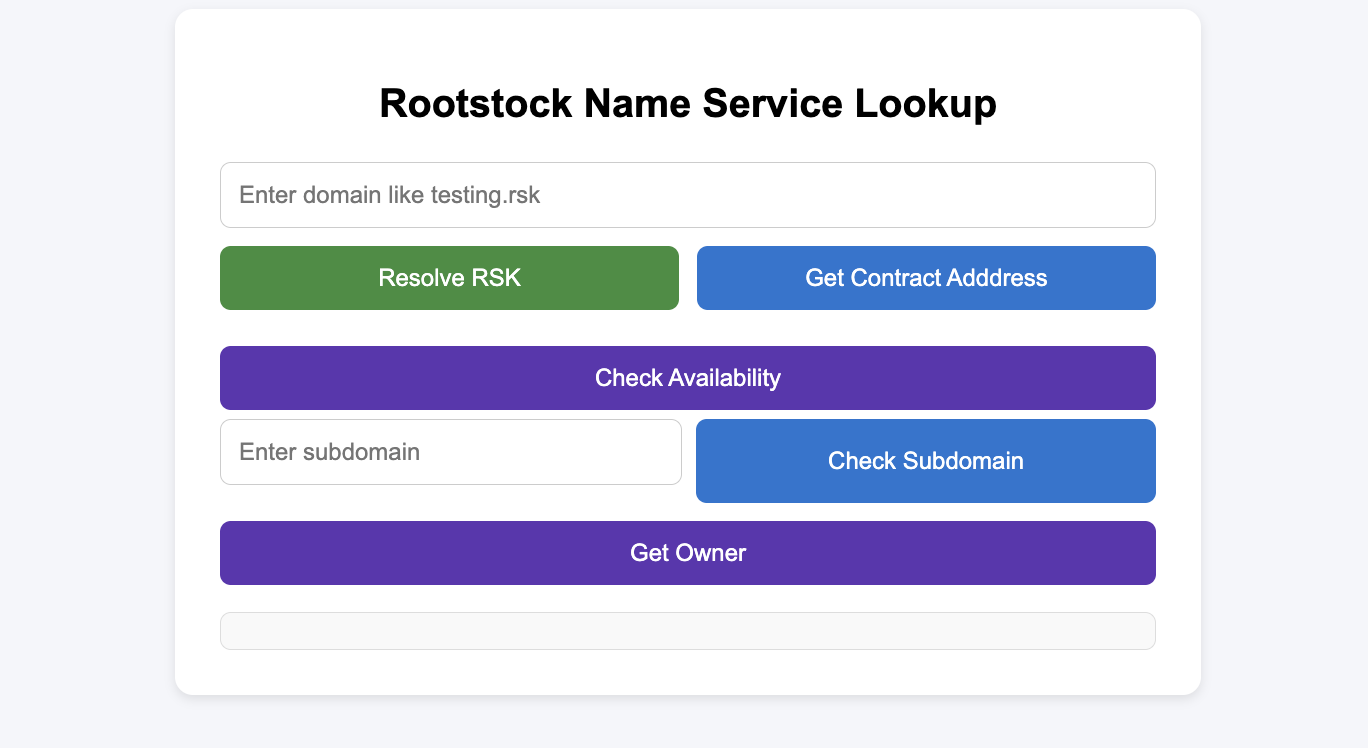
This is how your UI should look:
![RNS dApp](/img/rns/rns-dapp.png)

It should also function properly, as shown in the demo below:

## Troubleshooting

if you experience buffer error like this in your browser:

```bash
getAddressByRns error: ReferenceError: Buffer is not defined
    at hash (bundle.js:2:1)
    at e.hashDomain (bundle.js:2:1)
    at t.<anonymous> (bundle.js:2:1)
    at bundle.js:2:1
    at Object.next (bundle.js:2:1)
    at bundle.js:2:1
    at new Promise (<anonymous>)
    at n (bundle.js:2:1)
    at t.addr (bundle.js:2:1)
    at App.js:177:1
```

This mean the library uses a dependency that requires Buffer to be available globally. If you are using in a browser environment, you need to the following:

1. Install the dependency:

```bash
npm install -D buffer
```

2. If you have a `webpack.config.js` file in your project root, add this configuration to it:

```js
const webpackConfig = {
    resolve: {
        fallback: {
            buffer: require.resolve('buffer/'),
        },
    },
    plugins: [
        new webpack.ProvidePlugin({
            Buffer: ['buffer', 'Buffer'],
        }),
    ],
};
```

OR add this to your `index.js` file

```js
window.Buffer = window.Buffer || require('buffer/').Buffer;
```

OR if you're using Next.js, add it to `next.config.js`:

```js
module.exports = {
    webpack: (config) => {
        config.resolve.fallback = { buffer:     require.resolve('buffer/') };
        return config;
    },
};
```

## Extending the dApp

### Adding Write Operations

To enable write operations (registering domains, setting addresses), you'll need to:

1. Connect a wallet (MetaMask)
2. Use a Signer instead of Provider

```js
import { ethers } from 'ethers';

// Connect wallet
const web3Provider = new ethers.providers.Web3Provider(window.ethereum);
await web3Provider.send("eth_requestAccounts", []);
const signer = web3Provider.getSigner();

// Initialize SDK with signer for write operations
const rns = new RNS(ADDRESSES.registry, signer);
const addrResolver = new AddrResolver(ADDRESSES.registry, signer);
```

### Adding Domain Registration

See the [RNS SDK documentation](/developers/integrate/rns/js-sdk/) for complete examples of domain registration using `RSKRegistrar.commitToRegister()` and `RSKRegistrar.register()`.

## Conclusion

You've built a functional RNS lookup dApp using `@rsksmart/rns-sdk`. This demonstrates:

- Initializing SDK classes (`RNS`, `AddrResolver`, `RSKRegistrar`)
- Creating a custom React hook for RNS operations
- Resolving domains to addresses
- Checking domain and subdomain availability
- Querying domain ownership and resolver information

## Resources

- [RNS SDK GitHub Repository](https://github.com/rsksmart/rns-sdk)
- [RNS SDK Documentation](/developers/integrate/rns/js-sdk/)
- [RNS Registry Testnet](https://explorer.testnet.rootstock.io/address/0x7d284aaac6e925aad802a53c0c69efe3764597b8)
- [RNS Registry Mainnet](https://explorer.rootstock.io/address/0xcb868aeabd31e2b66f74e9a55cf064abb31a4ad5)
- [Rootstock Testnet Faucet](https://faucet.rootstock.io/)
