This page walks through end-to-end validation of the USSD-RSK bridge using the Africa's Talking sandbox simulator, raw `curl` commands, and on-chain verification via the Roostock Testnet Explorer. It also documents the current known limitations of the proof-of-concept and recommended improvements required before any production deployment.
## Live Demo Overview
The following demo shows the complete USSD flow running against the deployed `InclusiveDeFi` contract on Roostock Testnet. A user on a feature phone dials a shortcode, navigates the text menu, and triggers real blockchain transactions without a smartphone or internet connection.
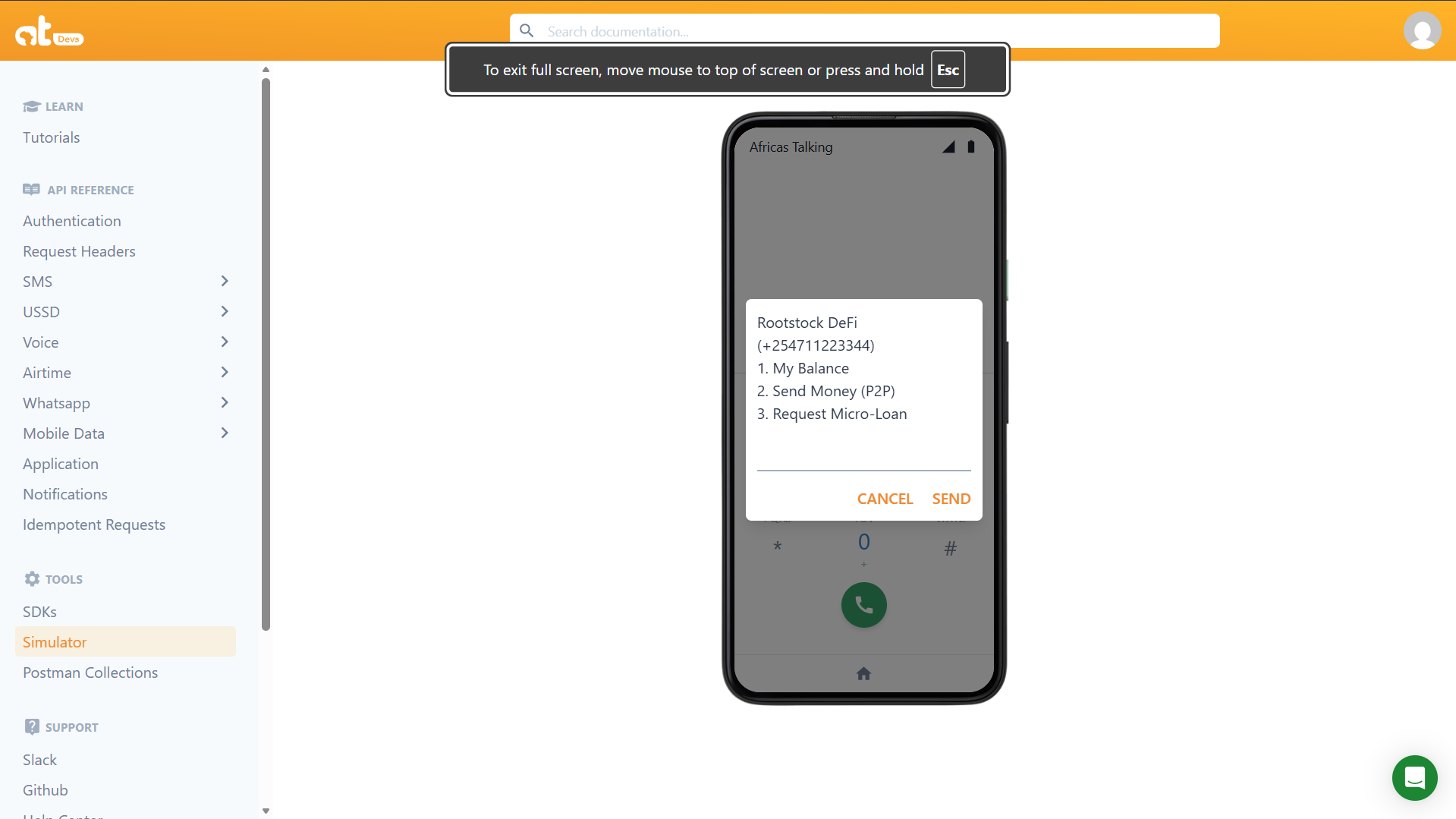
### Main Menu
When a user dials the shortcode (e.g., `*384#`), the relay server responds with the main menu. The phone number is echoed back to confirm the active session.
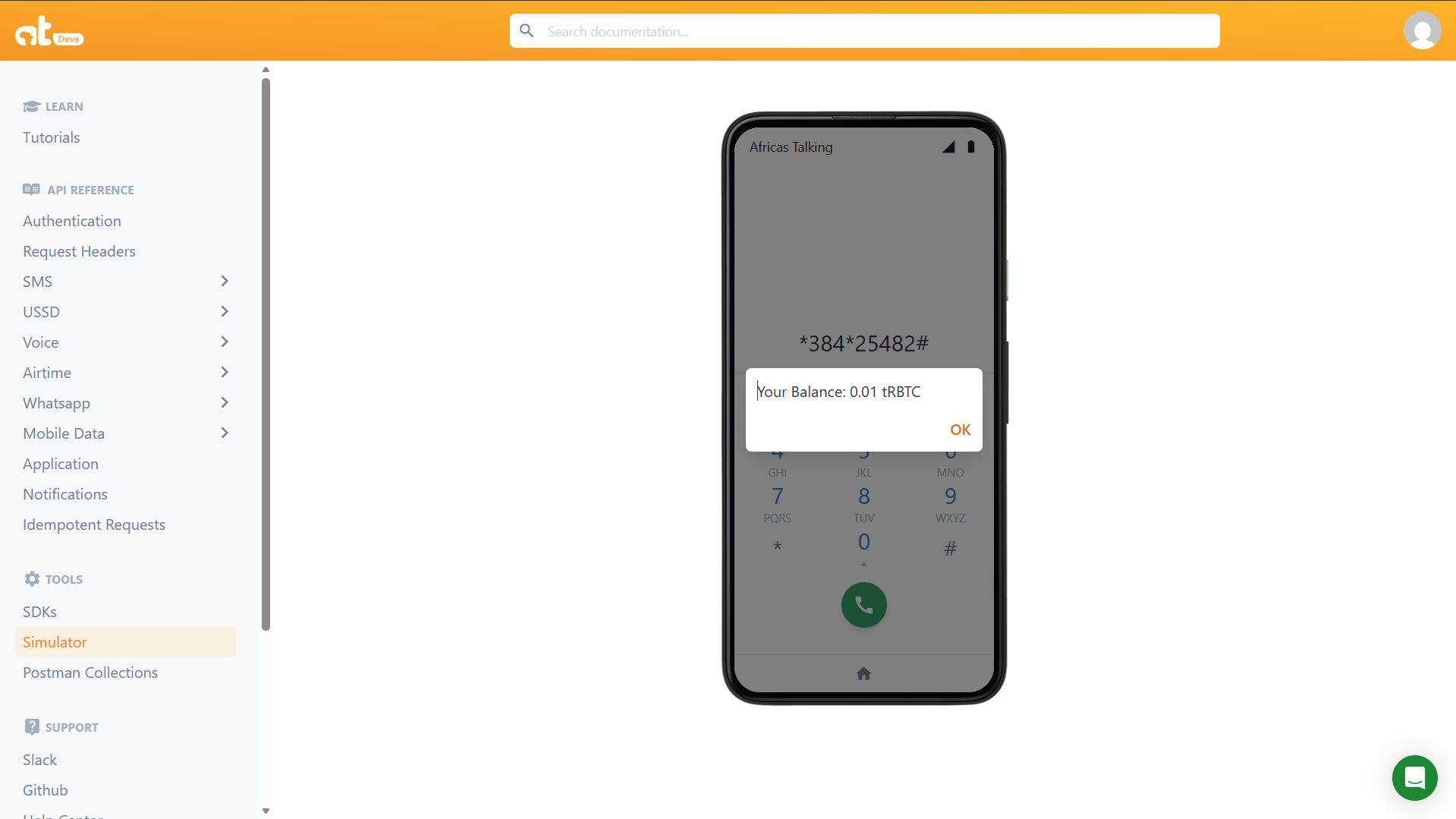
 ### Balance Check
Selecting option `1` triggers a read call to `getBalance(wallet.address)` on the Roostock node. No transaction is broadcast and no gas is consumed. The result is returned immediately and the session ends.
### Balance Check
Selecting option `1` triggers a read call to `getBalance(wallet.address)` on the Roostock node. No transaction is broadcast and no gas is consumed. The result is returned immediately and the session ends.
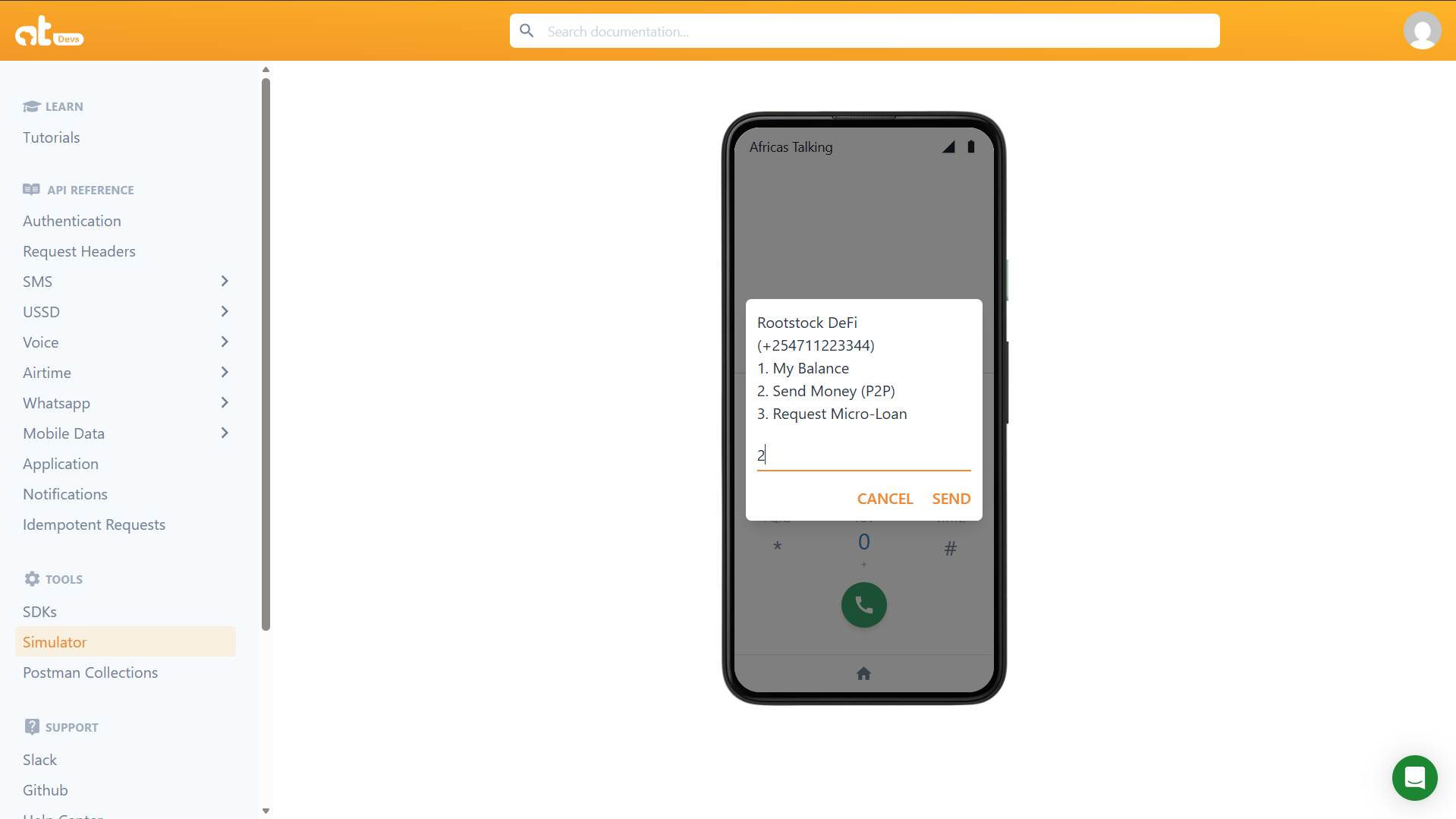
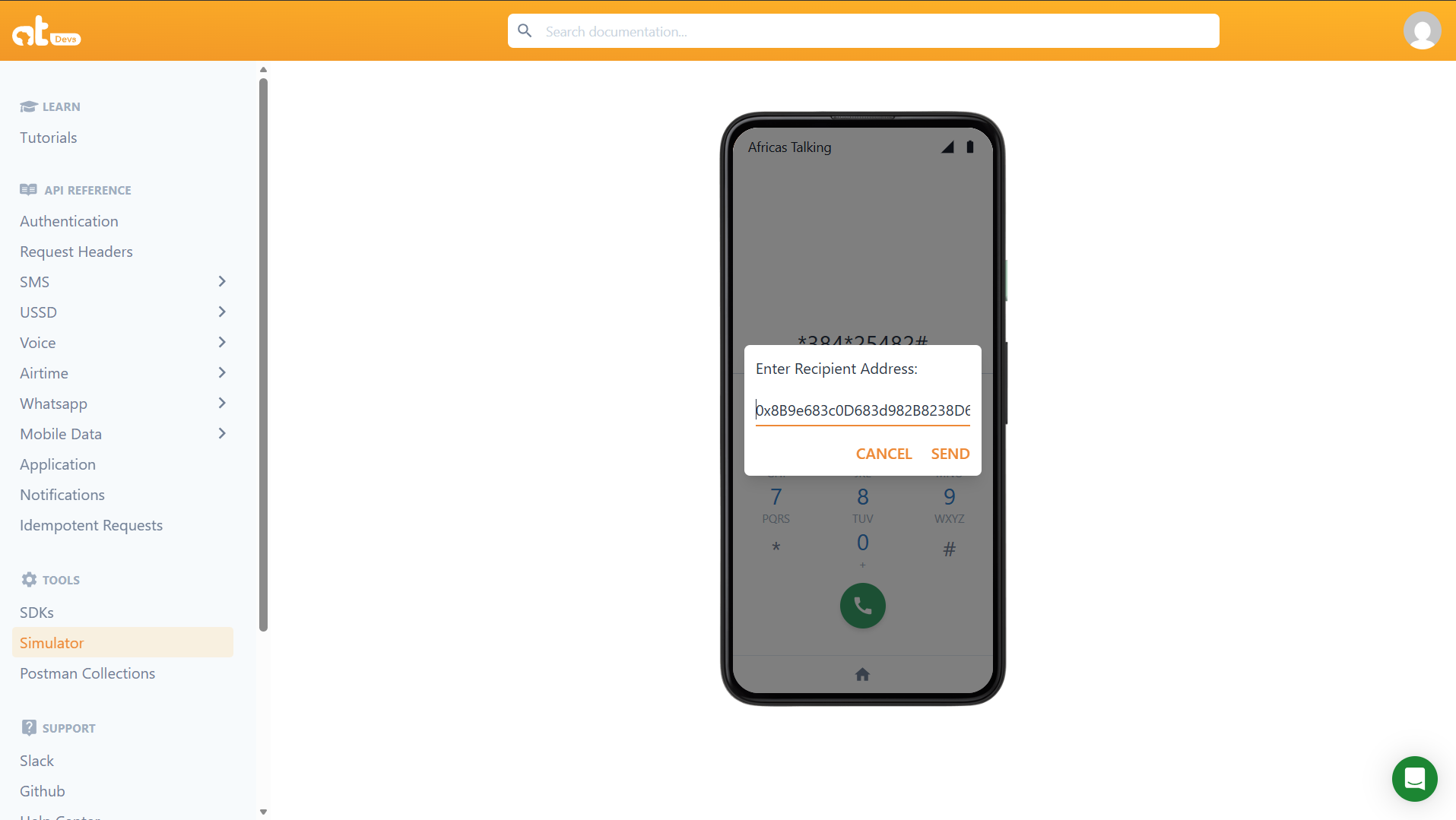
 ### P2P Transfer Flow
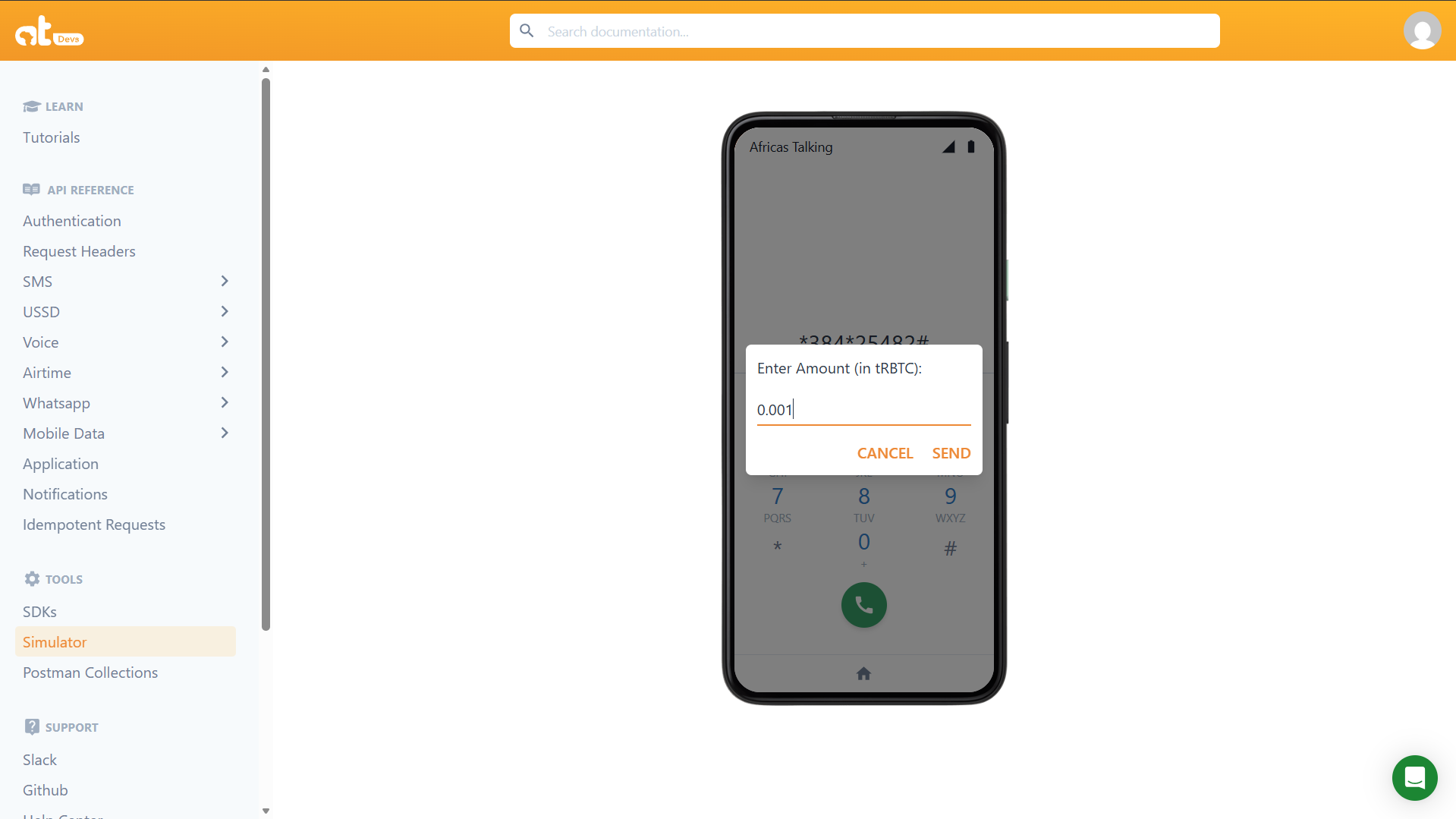
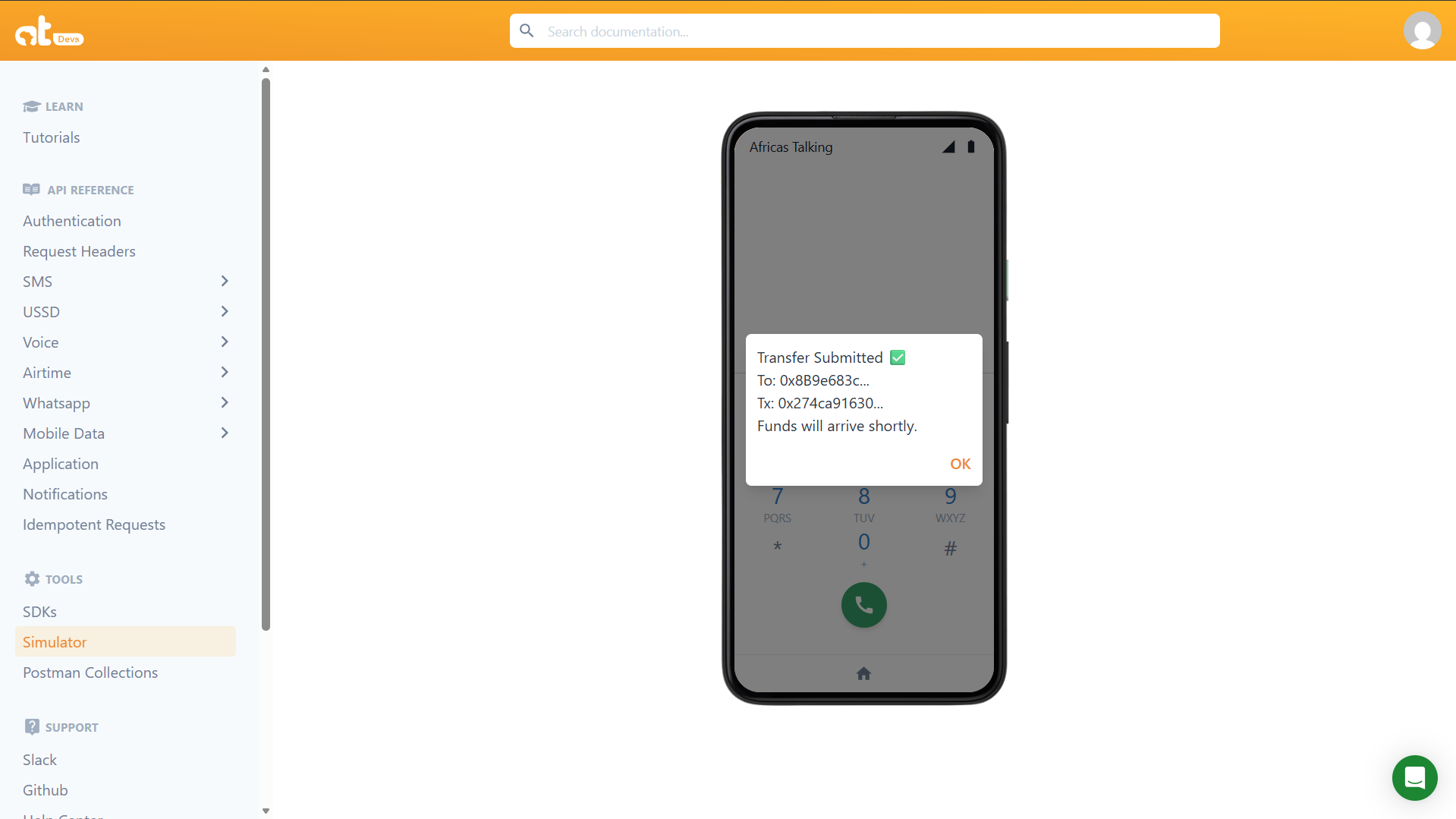
Selecting option `2` opens a three-round collection flow. The user enters the recipient address in round 2 and the amount in round 3. The relay server signs and broadcasts the transaction on round 4.
### P2P Transfer Flow
Selecting option `2` opens a three-round collection flow. The user enters the recipient address in round 2 and the amount in round 3. The relay server signs and broadcasts the transaction on round 4.
 ### Micro-Loan
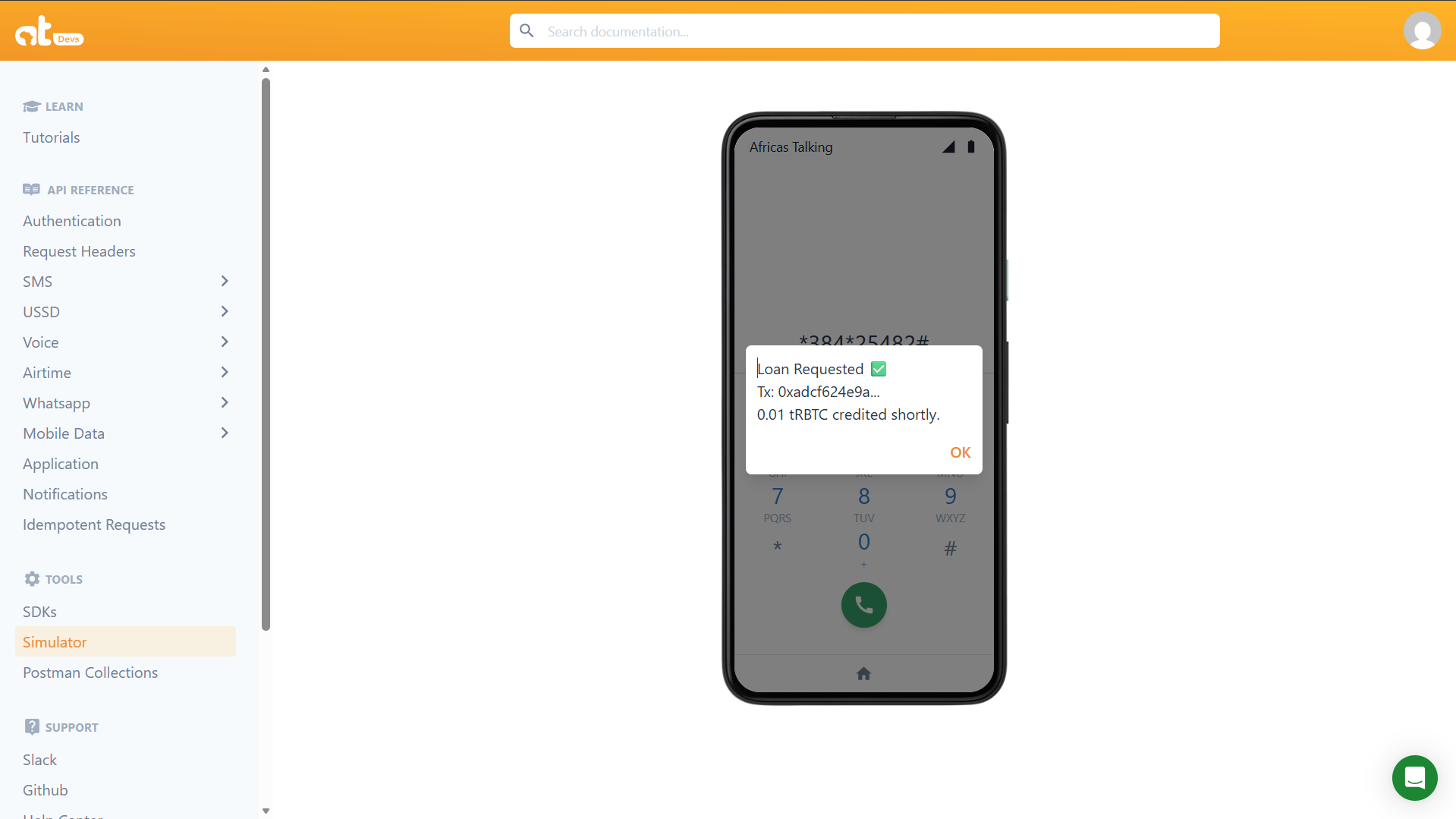
Selecting option `3` immediately calls `applyForLoan()`. If the address has no existing active loan, the contract credits `0.01 tRBTC` to its internal balance and emits a `LoanIssued` event.
### Micro-Loan
Selecting option `3` immediately calls `applyForLoan()`. If the address has no existing active loan, the contract credits `0.01 tRBTC` to its internal balance and emits a `LoanIssued` event.
 ### On-Chain Transaction Confirmation
Every write operation (transfer, loan) produces a transaction that can be verified on the Rootstock Testnet Explorer. The screenshot below shows a confirmed `applyForLoan` transaction.
## Testing Without a Phone Using curl
You can simulate the full USSD session lifecycle against your local relay server using `curl`. This allows you to test all branches of the state machine without the Africa's Talking gateway or a physical device.
Ensure your relay server is running (`npm run start-bridge`) before executing these commands.
### Main Menu
```bash
curl -X POST http://localhost:3000/ussd \
-d "text=&phoneNumber=%2B2348012345678&sessionId=test001"
```
Expected response:
```plaintext
CON Rootstock DeFi (+2348012345678)
1. My Balance
2. Send Money (P2P)
3. Request Micro-Loan
```
### Balance Check
```bash
curl -X POST http://localhost:3000/ussd \
-d "text=1&phoneNumber=%2B2348012345678&sessionId=test001"
```
Expected response:
```plaintext
END Your Balance: 0.01 tRBTC
```
### Transfer Recipient Prompt
```bash
curl -X POST http://localhost:3000/ussd \
-d "text=2&phoneNumber=%2B2348012345678&sessionId=test002"
```
Expected response:
```plaintext
CON Enter Recipient Address:_________
```
### Transfer Amount Prompt
```bash
curl -X POST http://localhost:3000/ussd \
-d "text=2*0xSomeRecipientAddress&phoneNumber=%2B2348012345678&sessionId=test002"
```
Expected response:
```plaintext
CON Enter Amount:_____
```
### Transfer Execute
Replace `0xSomeRecipientAddress` with a valid Roostock address and `0.005` with your desired amount.
```bash
curl -X POST http://localhost:3000/ussd \
-d "text=2*0xSomeRecipientAddress*0.005&phoneNumber=%2B2348012345678&sessionId=test002"
```
Expected response (address and hash will differ):
```plaintext
END Transfer Submitted
To: 0xSomeRecip...
Tx: 0xa924c40ed1...
Funds will arrive shortly.
```
:::note
The transaction enters the Rootstock mempool immediately and the session ends. The server terminal will log `Transfer confirmed: 0x...` once the block is mined. The full transaction hash is available in your server logs if you need to look it up on the explorer.
:::
### Micro Loan
```bash
curl -X POST http://localhost:3000/ussd \
-d "text=3&phoneNumber=%2B2348012345678&sessionId=test003"
```
Expected response (hash will differ):
```plaintext
END Loan Requested
Tx: 0xa924c40ed1...
0.01 tRBTC credited shortly.
```
:::note
Like the transfer, the loan transaction is submitted to the mempool and the USSD session ends immediately. Watch your server terminal for the background confirmation log `Loan confirmed: 0x...`. If the contract reverts on chain (e.g., because a loan is already active), it will appear as `Loan failed on-chain: Existing loan active` in the server logs. The user will not see this message since the session is already closed.
:::
## Verifying Transactions On-Chain
After any write operation through the relay server, verify the transaction on the Roostock Testnet Explorer by searching for your deployed contract address.
```
https://explorer.testnet.rootstock.io/address/0xYourDeployedContractAddress
```
You can also search by transaction hash. The truncated hash is returned in the `END` response string from the relay server (e.g., `Tx: 0xa924c40ed1...`). Copy the full hash from your server terminal logs. A successful transaction will show the following fields.
- **Status:** Success
- **To:** Your deployed contract address
- **Input Data:** The encoded function call (`applyForLoan`, `transfer`, etc.)
- **Block:** The block number it was included in
You can also inspect `ignition/deployments/chain-31/journal.jsonl` to review all deployment transactions, including their block hashes and receipt status.
## Africa's Talking Simulator
For end-to-end testing with the real USSD protocol (including session ID management and proper `CON`/`END` handling), use the built-in **USSD Simulator** in the Africa's Talking sandbox dashboard.
1. Open your sandbox dashboard at [account.africastalking.com/apps/sandbox](https://account.africastalking.com/apps/sandbox).
2. Navigate to **USSD > Simulator**.
3. Enter a test phone number and dial your shortcode.
4. Navigate the menu and observe the responses.
The ngrok inspector at `http://localhost:4040` will show you every raw HTTP POST from Africa's Talking and every response your server returns. This is essential for debugging unexpected session terminations or malformed responses.
## Known Limitations and Recommended Improvements
The current implementation is a working proof of concept. The following limitations must be addressed before any production or mainnet deployment.
**Single relayer wallet for all users.** The `getBalance()` call always returns the relay wallet's balance, not the individual user's balance, because all transactions are signed by the same wallet. Map each `phoneNumber` to a unique wallet address stored in a database (e.g., PostgreSQL or Redis), and derive or assign wallets per user at first dial.
**In-memory session guard.** The `processedSessions` Set that prevents duplicate transactions is held in memory and resets on every server restart. Under horizontal scaling, two server instances will have separate Sets, which breaks the duplicate-prevention guarantee. Move session state to a shared Redis store with a matching TTL.
**No input validation.** Recipient addresses and amounts from the USSD `text` field are passed to ethers.js without explicit format checks. A non-numeric amount string passed to `ethers.parseEther()` will throw a non-descriptive error. Add address and numeric format validation before calling contract functions.
**No loan repayment mechanism.** `applyForLoan()` issues a loan with no way to repay it. The `require(loans[msg.sender] == 0)` guard prevents a second loan, but there is no `repayLoan()` function. Add a repayment flow to `InclusiveDeFi.sol` that accepts tRBTC and clears the `loans` mapping entry, then expose it as option `4` in the USSD menu.
**Post-broadcast reverts are not visible to the user.** Because `tx.wait()` runs in the background after the USSD session has ended, any on-chain revert that occurs after broadcast cannot be communicated back to the user. The user will see the `END Transfer Submitted` screen regardless of the final on-chain outcome. Monitor server logs actively and consider adding a secondary USSD option that lets users check transaction status by hash.
**No formal meta-transaction standard.** The relayer pattern used here is informal. The smart contract cannot distinguish between the relay wallet acting on behalf of different users, since all calls appear to originate from the same `msg.sender`. Implement [EIP-2771](https://eips.ethereum.org/EIPS/eip-2771) trusted forwarder to allow the contract to identify the true originating user via their phone-mapped wallet address.
**Private key stored in `.env`.** The relayer private key is stored in a plaintext `.env` file. For any deployment beyond local development, move secrets to a secrets manager such as AWS Secrets Manager or HashiCorp Vault, or use an HSM-backed signing service.
### On-Chain Transaction Confirmation
Every write operation (transfer, loan) produces a transaction that can be verified on the Rootstock Testnet Explorer. The screenshot below shows a confirmed `applyForLoan` transaction.
## Testing Without a Phone Using curl
You can simulate the full USSD session lifecycle against your local relay server using `curl`. This allows you to test all branches of the state machine without the Africa's Talking gateway or a physical device.
Ensure your relay server is running (`npm run start-bridge`) before executing these commands.
### Main Menu
```bash
curl -X POST http://localhost:3000/ussd \
-d "text=&phoneNumber=%2B2348012345678&sessionId=test001"
```
Expected response:
```plaintext
CON Rootstock DeFi (+2348012345678)
1. My Balance
2. Send Money (P2P)
3. Request Micro-Loan
```
### Balance Check
```bash
curl -X POST http://localhost:3000/ussd \
-d "text=1&phoneNumber=%2B2348012345678&sessionId=test001"
```
Expected response:
```plaintext
END Your Balance: 0.01 tRBTC
```
### Transfer Recipient Prompt
```bash
curl -X POST http://localhost:3000/ussd \
-d "text=2&phoneNumber=%2B2348012345678&sessionId=test002"
```
Expected response:
```plaintext
CON Enter Recipient Address:_________
```
### Transfer Amount Prompt
```bash
curl -X POST http://localhost:3000/ussd \
-d "text=2*0xSomeRecipientAddress&phoneNumber=%2B2348012345678&sessionId=test002"
```
Expected response:
```plaintext
CON Enter Amount:_____
```
### Transfer Execute
Replace `0xSomeRecipientAddress` with a valid Roostock address and `0.005` with your desired amount.
```bash
curl -X POST http://localhost:3000/ussd \
-d "text=2*0xSomeRecipientAddress*0.005&phoneNumber=%2B2348012345678&sessionId=test002"
```
Expected response (address and hash will differ):
```plaintext
END Transfer Submitted
To: 0xSomeRecip...
Tx: 0xa924c40ed1...
Funds will arrive shortly.
```
:::note
The transaction enters the Rootstock mempool immediately and the session ends. The server terminal will log `Transfer confirmed: 0x...` once the block is mined. The full transaction hash is available in your server logs if you need to look it up on the explorer.
:::
### Micro Loan
```bash
curl -X POST http://localhost:3000/ussd \
-d "text=3&phoneNumber=%2B2348012345678&sessionId=test003"
```
Expected response (hash will differ):
```plaintext
END Loan Requested
Tx: 0xa924c40ed1...
0.01 tRBTC credited shortly.
```
:::note
Like the transfer, the loan transaction is submitted to the mempool and the USSD session ends immediately. Watch your server terminal for the background confirmation log `Loan confirmed: 0x...`. If the contract reverts on chain (e.g., because a loan is already active), it will appear as `Loan failed on-chain: Existing loan active` in the server logs. The user will not see this message since the session is already closed.
:::
## Verifying Transactions On-Chain
After any write operation through the relay server, verify the transaction on the Roostock Testnet Explorer by searching for your deployed contract address.
```
https://explorer.testnet.rootstock.io/address/0xYourDeployedContractAddress
```
You can also search by transaction hash. The truncated hash is returned in the `END` response string from the relay server (e.g., `Tx: 0xa924c40ed1...`). Copy the full hash from your server terminal logs. A successful transaction will show the following fields.
- **Status:** Success
- **To:** Your deployed contract address
- **Input Data:** The encoded function call (`applyForLoan`, `transfer`, etc.)
- **Block:** The block number it was included in
You can also inspect `ignition/deployments/chain-31/journal.jsonl` to review all deployment transactions, including their block hashes and receipt status.
## Africa's Talking Simulator
For end-to-end testing with the real USSD protocol (including session ID management and proper `CON`/`END` handling), use the built-in **USSD Simulator** in the Africa's Talking sandbox dashboard.
1. Open your sandbox dashboard at [account.africastalking.com/apps/sandbox](https://account.africastalking.com/apps/sandbox).
2. Navigate to **USSD > Simulator**.
3. Enter a test phone number and dial your shortcode.
4. Navigate the menu and observe the responses.
The ngrok inspector at `http://localhost:4040` will show you every raw HTTP POST from Africa's Talking and every response your server returns. This is essential for debugging unexpected session terminations or malformed responses.
## Known Limitations and Recommended Improvements
The current implementation is a working proof of concept. The following limitations must be addressed before any production or mainnet deployment.
**Single relayer wallet for all users.** The `getBalance()` call always returns the relay wallet's balance, not the individual user's balance, because all transactions are signed by the same wallet. Map each `phoneNumber` to a unique wallet address stored in a database (e.g., PostgreSQL or Redis), and derive or assign wallets per user at first dial.
**In-memory session guard.** The `processedSessions` Set that prevents duplicate transactions is held in memory and resets on every server restart. Under horizontal scaling, two server instances will have separate Sets, which breaks the duplicate-prevention guarantee. Move session state to a shared Redis store with a matching TTL.
**No input validation.** Recipient addresses and amounts from the USSD `text` field are passed to ethers.js without explicit format checks. A non-numeric amount string passed to `ethers.parseEther()` will throw a non-descriptive error. Add address and numeric format validation before calling contract functions.
**No loan repayment mechanism.** `applyForLoan()` issues a loan with no way to repay it. The `require(loans[msg.sender] == 0)` guard prevents a second loan, but there is no `repayLoan()` function. Add a repayment flow to `InclusiveDeFi.sol` that accepts tRBTC and clears the `loans` mapping entry, then expose it as option `4` in the USSD menu.
**Post-broadcast reverts are not visible to the user.** Because `tx.wait()` runs in the background after the USSD session has ended, any on-chain revert that occurs after broadcast cannot be communicated back to the user. The user will see the `END Transfer Submitted` screen regardless of the final on-chain outcome. Monitor server logs actively and consider adding a secondary USSD option that lets users check transaction status by hash.
**No formal meta-transaction standard.** The relayer pattern used here is informal. The smart contract cannot distinguish between the relay wallet acting on behalf of different users, since all calls appear to originate from the same `msg.sender`. Implement [EIP-2771](https://eips.ethereum.org/EIPS/eip-2771) trusted forwarder to allow the contract to identify the true originating user via their phone-mapped wallet address.
**Private key stored in `.env`.** The relayer private key is stored in a plaintext `.env` file. For any deployment beyond local development, move secrets to a secrets manager such as AWS Secrets Manager or HashiCorp Vault, or use an HSM-backed signing service.