Zero-Knowledge Proofs on Rootstock with Noir
Zero-knowledge proofs let a user prove they know something (a secret code, a credential, ownership) without ever revealing the secret itself on Rootstock.
This hands-on tutorial teaches you how to use Noir (a developer-friendly ZK DSL - Domain Specific Language) to build a Secret NFT Club: users get an exclusive membership only by proving they know the secret password, the password never appears on-chain or in the browser console.
What You'll Build
A privacy-preserving membership system where:
- Users prove they know a secret password without revealing it
- The proof is verified on-chain using zero-knowledge cryptography
- Members are able to join the club upon successful verification
- The password never appears in transactions, logs, or browser console
Privacy guarantee: Even if someone inspects all blockchain data, they cannot determine the secret password.
Prerequisites
- Node.js ≥ 18
- Rust (for Noir toolchain)
- MetaMask wallet with tRBTC on Rootstock Testnet (Get tRBTC from Faucet)
- Basic knowledge of Solidity and React/Next.js
🚨 Windows Users: Noir (nargo, bb) isn’t natively supported on Windows. Please install and run Noir inside WSL (Windows Subsystem for Linux) using Ubuntu 24.04.. 🚨
Part 1: Setup & Circuit Development
Step 1: Install Noir (Nargo CLI)
We'll use nargo version = 1.0.0-beta.3.
curl -L https://raw.githubusercontent.com/noir-lang/noirup/refs/heads/main/install | bash
noirup -v 1.0.0-beta.3
Verify installation:
nargo --version
# Should output: nargo version = 1.0.0-beta.3
Step 2: Install Barretenberg Backend
Barretenberg is the proving backend that generates and verifies zero-knowledge proofs. We use it for key operations such as generating proofs, producing and checking verification keys, and generating the verifier smart contract. Without Barretenberg, our dApp wouldn’t be able to let users prove they know the club’s secret code privately, without ever revealing the code itself.
curl -L https://raw.githubusercontent.com/AztecProtocol/aztec-packages/refs/heads/master/barretenberg/bbup/install | bash
bbup -v 0.82.2
Verify:
Make sure to open a new terminal to verify your installation if you get the error bb command not found
bb --version
# Should output: v0.82.2
Step 3: Create the ZK Circuit
Create a new Noir project:
nargo new secret_club
cd secret_club
Replace src/main.nr with this circuit:
use std::hash::pedersen_hash;

fn main(secret: Field, public_hash: pub Field) {
    let computed_hash = pedersen_hash([secret]);
    assert(computed_hash == public_hash);
}
What this does:
- Takes a
secret(private input - never revealed) - Takes a
public_hash(public input - visible to everyone) - Computes Pedersen hash of the secret
- Asserts they match (proof succeeds only if user knows the correct secret)
Compile the circuit:
nargo compile
This creates target/secret_club.json containing the compiled circuit.
Step 4: Compute the Secret Hash
Critical Step: We need to calculate the Pedersen hash of our secret password before deployment. This hash will be public and stored in the smart contract.
Convert Your Password to Field Element
Convert your secret password to a Field element using SHA256 (recommended for uniform distribution):
echo -n "supersecret2025" | sha256sum | awk '{print "0x"$1}'
Expected Output:
0x04e94fe643fe9000c83dd91f0be27855aa2cd791a3dfc1e05775749e89f4693e
Now let's compute the Pedersen Hash
To compute the pedersen hash, we'll slightly modify our main.nr
We're adding a println to print the perderson hash and we're writing a test to output this hash to the console.
use std::hash::pedersen_hash;

fn main(secret: Field, public_hash: pub Field) {
    let computed_hash = pedersen_hash([secret]);

    println(computed_hash); // we added this line to print the perderson hash

    assert(computed_hash == public_hash);
}

#[test]
fn test_main() {
    main(
        0x04e94fe643fe9000c83dd91f0be27855aa2cd791a3dfc1e05775749e89f4693e,
        0x3, // this is just a placeholder for the public hash which will cause the test to fail, but we will get the perderson hash logged to the console
    );
}
Then in your terminal, run the command
nargo test --show-output
Look for the test_main stdout in the output - this is your Pedersen hash!
Example output:
--- test_main stdout ---
0x297fad8a9bc7f877e7ae8ab582a32a16ec2d11cc57cd77ecab97d2c775fa29e8
------------------------
Save this hash! You'll need it for:
- Smart contract deployment
- Frontend configuration
- Testing
Before we can proceed to run the nargo execute command, we need to generate a Prover.toml file.
This file holds the witness values (i.e. the secret and the public_hash).
To generate it, we start by running:
nargo check
Running nargo check creates a new Prover.toml file, prefilled based on the inputs defined in the main function of our main.nr circuit:
public_hash = ""
secret = ""
Now we can fill in these fields with our actual witness values — the hashed secret (for example, the SHA-256 hash of 'supersecret2025') and the public_hash (the corresponding Pedersen hash):
public_hash = "0x297fad8a9bc7f877e7ae8ab582a32a16ec2d11cc57cd77ecab97d2c775fa29e8"
secret = "0x04e94fe643fe9000c83dd91f0be27855aa2cd791a3dfc1e05775749e89f4693e"
Once the Prover.toml file is filled, you can proceed to compile and execute the circuit:
nargo compile
nargo execute
These commands generate the secret_club.json and secret_club.gz files, which we will use moving forward.
🚨🚨 Always delete the files in the target folder when you change your circuit or inputs to ensure a clean setup. Whenever the circuit changes, you must also regenerate and replace the verifier smart contract in your Solidity project. 🚨🚨
Step 5: Generate the Solidity Verifier
Modern Noir uses Barretenberg to generate the Solidity verifier:
# Generate verification key
bb write_vk --oracle_hash keccak -b ./target/secret_club.json -o ./target

# Generate Solidity verifier contract
bb write_solidity_verifier -k ./target/vk -o ./target/Verifier.sol
This creates Verifier.sol in the ./target/Verifier.sol. The vk is embedded into this contract, enabling Rootsock to check proofs generated for your circuit.
Part 2: Smart Contract Development
Step 6: Create the Secret NFT Club Contract
Setup Hardhat
Install dependencies:
Make sure to run these commands in the existing secret_club folder.
mkdir smart-contracts
cd smart-contracts
npx hardhat --init
You should see somethig like this below;
➜  smart-contracts git:(main) npx hardhat --init

 █████  █████                         ███  ███                  ███      ██████
░░███  ░░███                         ░███ ░███                 ░███     ███░░███
 ░███   ░███   ██████  ████████   ███████ ░███████    ██████  ███████  ░░░  ░███
 ░██████████  ░░░░░███░░███░░███ ███░░███ ░███░░███  ░░░░░███░░░███░      ████░
 ░███░░░░███   ███████ ░███ ░░░ ░███ ░███ ░███ ░███   ███████  ░███      ░░░░███
 ░███   ░███  ███░░███ ░███     ░███ ░███ ░███ ░███  ███░░███  ░███ ███ ███ ░███
 █████  █████░░███████ █████    ░░███████ ████ █████░░███████  ░░█████ ░░██████
░░░░░  ░░░░░  ░░░░░░░ ░░░░░      ░░░░░░░ ░░░░ ░░░░░  ░░░░░░░    ░░░░░   ░░░░░░

👷 Welcome to Hardhat v3.0.16 👷

✔ Which version of Hardhat would you like to use? · hardhat-3
✔ Where would you like to initialize the project?

Please provide either a relative or an absolute path: · ./
✔ What type of project would you like to initialize? · mocha-ethers
✨ Template files copied ✨
✔ You need to install the necessary dependencies using the following command:
npm install --save-dev "hardhat@^3.0.16" "@nomicfoundation/hardhat-toolbox-mocha-ethers@^3.0.1" "@nomicfoundation/hardhat-ethers@^4.0.2" "@nomicfoundation/hardhat-ignition@^3.0.5" "@types/chai@^4.2.0" "@types/chai-as-promised@^8.0.1" "@types/mocha@>=10.0.10" "@types/node@^22.8.5" "chai@^5.1.2" "ethers@^6.14.0" "forge-std@foundry-rs/forge-std#v1.9.4" "mocha@^11.0.0" "typescript@~5.8.0"

Do you want to run it now? (Y/n) · true

npm install --save-dev "hardhat@^3.0.16" "@nomicfoundation/hardhat-toolbox-mocha-ethers@^3.0.1" "@nomicfoundation/hardhat-ethers@^4.0.2" "@nomicfoundation/hardhat-ignition@^3.0.5" "@types/chai@^4.2.0" "@types/chai-as-promised@^8.0.1" "@types/mocha@>=10.0.10" "@types/node@^22.8.5" "chai@^5.1.2" "ethers@^6.14.0" "forge-std@foundry-rs/forge-std#v1.9.4" "mocha@^11.0.0" "typescript@~5.8.0"
npm warn deprecated inflight@1.0.6: This module is not supported, and leaks memory. Do not use it. Check out lru-cache if you want a good and tested way to coalesce async requests by a key value, which is much more comprehensive and powerful.
npm warn deprecated glob@7.1.7: Glob versions prior to v9 are no longer supported

added 275 packages, and audited 276 packages in 57s

71 packages are looking for funding
  run `npm fund` for details

found 0 vulnerabilities
✨ Dependencies installed ✨
Give Hardhat a star on Github if you're enjoying it! ⭐️✨

     https://github.com/NomicFoundation/hardhat
➜  smart-contracts git:(main) ✗
You can delete all the existing template files in the contracts folder, i.e. the Counter.sol and the Counter.t.sol files.
Then, create a new contract; contracts/SecretNFTClub.sol:
// SPDX-License-Identifier: MIT
pragma solidity ^0.8.24;

interface IVerifier {
    function verify(
        bytes calldata _proof,
        bytes32[] calldata _publicInputs
    ) external view returns (bool);
}

contract SecretNFTClub {
    IVerifier public immutable verifier;
    bytes32 public immutable secretHash;

    mapping(address => bool) public hasJoined;
    mapping(address => uint256) public memberTokenId;

    uint256 private _nextTokenId;

    event MemberJoined(address indexed member, uint256 indexed tokenId);

    error AlreadyMember();
    error InvalidProof();

    constructor(bytes32 _secretHash, address _verifier) {
        secretHash = _secretHash;
        verifier = IVerifier(_verifier);
    }

    function join(bytes calldata proof) external {
        if (hasJoined[msg.sender]) revert AlreadyMember();

        // Prepare public inputs (just the secret hash)
        bytes32[] memory publicInputs = new bytes32[](1);
        publicInputs[0] = secretHash;

        // Verify the zero-knowledge proof
        if (!verifier.verify(proof, publicInputs)) revert InvalidProof();

        // Proof verified! Grant membership
        uint256 tokenId = _nextTokenId++;
        hasJoined[msg.sender] = true;
        memberTokenId[msg.sender] = tokenId;

        emit MemberJoined(msg.sender, tokenId);
    }

    function isMember(address account) external view returns (bool) {
        return hasJoined[account];
    }

    function totalMembers() external view returns (uint256) {
        return _nextTokenId;
    }
}
Make sure to also copy the the Verifier contract from ./target/Verifier.sol into your smart-contracts directory in a new file contracts/Verifier.sol. This contract will also be deployed and will be used on our SecretNFTClub contract to verify a proof.
Design decisions:
- Simple mapping-based membership (more gas-efficient than ERC721)
- Immutable verifier and hash (gas optimization + security)
- Custom errors (saves gas over require strings)
- Events for off-chain tracking
Part 3: Deployment
Step 7: Deploy to Rootstock Testnet
These details can be configured on your software wallet(i.e. Metamask, Rabby), you can see this page: Configure MetaMask Wallet for Rootstock
Rootstock Testnet Details:
| Parameter | Value |
|---|---|
| RPC URL | https://public-node.testnet.rsk.co |
| Chain ID | 31 |
| Currency | tRBTC |
| Block Explorer | https://rootstock-testnet.blockscout.com/ |
| Faucet | https://faucet.rootstock.io |
Then, we'll need to install dotenv for the environment variables we're going to be using in the hardhat.config.ts.
We'll do that by running the command:
npm install dotenv
Configure hardhat.config.ts:
import hardhatToolboxMochaEthersPlugin from "@nomicfoundation/hardhat-toolbox-mocha-ethers";
import { configVariable, defineConfig } from "hardhat/config";
import dotenv from "dotenv";
dotenv.config();

export default defineConfig({
  plugins: [hardhatToolboxMochaEthersPlugin],
  solidity: {
    profiles: {
      default: {
        version: "0.8.28",
      },
      production: {
        version: "0.8.28",
        settings: {
          optimizer: {
            enabled: true,
            runs: 200,
          },
        },
      },
    },
  },
  networks: {
    hardhatMainnet: {
      type: "edr-simulated",
      chainType: "l1",
    },
    hardhatOp: {
      type: "edr-simulated",
      chainType: "op",
    },
    sepolia: {
      type: "http",
      chainType: "l1",
      url: configVariable("SEPOLIA_RPC_URL"),
      accounts: [configVariable("SEPOLIA_PRIVATE_KEY")],
    },
    rootstock: {
      type: "http",
      url: process.env.ROOTSTOCK_TESTNET_RPC_URL!,
      accounts: [process.env.WALLET_KEY!],
    },
  },
});
Create .env:
WALLET_KEY=your_private_key_here
ROOTSTOCK_TESTNET_RPC_URL=your_rootstock_testnetrpc_url_here
Deployment Script
Create scripts/deploy.js:
import { network } from "hardhat";
import fs from "fs";

const { ethers, networkName } = await network.connect();

async function main() {
  console.log("🚀 Deploying to Rootstock Testnet...\n");

  // Deploy HonkVerifier
  console.log("📝 Deploying HonkVerifier...");
  const Verifier = await ethers.getContractFactory("HonkVerifier");
  const verifier = await Verifier.deploy();
  await verifier.waitForDeployment();

  const verifierAddress = await verifier.getAddress();
  console.log("✅ HonkVerifier deployed:", verifierAddress);

  // IMPORTANT: Replace wnvdjfbjfnejrfg rewhi gfignrkndknfdkwnkdnfjwfn owj nrwb grujwbzzzZZith YOUR computed Pedersen hash from Step 4
  const SECRET_HASH =
    "0x297fad8a9bc7f877e7ae8ab582a32a16ec2d11cc57cd77ecab97d2c775fa29e8";

  // Deploy SecretNFTClub
  console.log("\n📝 Deploying SecretNFTClub...");
  const Club = await ethers.getContractFactory("SecretNFTClub");
  const club = await Club.deploy(SECRET_HASH, verifierAddress);
  await club.waitForDeployment();

  const clubAddress = await club.getAddress();
  console.log("✅ SecretNFTClub deployed:", clubAddress);

  // Summary
  console.log("\n" + "=".repeat(50));
  console.log("📋 DEPLOYMENT SUMMARY");
  console.log("=".repeat(50));
  console.log("Verifier:    ", verifierAddress);
  console.log("Club:        ", clubAddress);
  console.log("Secret Hash: ", SECRET_HASH);
  console.log("Network:     ", "Rootstock Testnet");
  console.log(
    "Explorer:    ",
    `https://explorer.testnet.rootstock.io/address/${clubAddress}`
  );
  console.log("=".repeat(50));

  // Save addresses for frontend
  fs.writeFileSync(
    "deployment.json",
    JSON.stringify(
      {
        verifier: verifierAddress,
        club: clubAddress,
        secretHash: SECRET_HASH,
        network: "rootstock",
      },
      null,
      2
    )
  );

  console.log("\n✅ Addresses saved to deployment.json");
}

main()
  .then(() => process.exit(0))
  .catch((error) => {
    console.error(error);
    process.exit(1);
  });
Deploy:
npx hardhat run scripts/deploy.js --build-profile production --network rootstock
This command runs your deployment script using the hardhat production build profile and deploys the contracts to the Rootstock testnet network.
Expected output:
🚀 Deploying to Rootstock Testnet...

📝 Deploying HonkVerifier...
✅ UltraVerifier deployed: 0x1234...

📝 Deploying SecretNFTClub...
✅ SecretNFTClub deployed: 0x5678...
Deployment Summary
This script takes care of deploying two smart contracts HonkVerifier and SecretNFTClub to the Rootstock Testnet. Once the deployment is complete, it provides a helpful summary so you can quickly confirm everything went as expected.
What the summary shows
After both contracts are successfully deployed, the script prints out:
- The contract address of the
HonkVerifier - The contract address of the
SecretNFTClub - The secret hash used during verification
- The network name (Rootstock Testnet)
- A direct explorer link to view the
SecretNFTClubcontract on the Rootstock Testnet
This makes it easy to immediately verify the deployment and locate your contracts on-chain.
Saving deployment details
In addition to logging the details to the console, the script also saves all relevant deployment information to a deployment.json file. This file can be reused by your frontend or other scripts to interact with the deployed contracts without hardcoding addresses or configuration values.
Why this matters
The deployment summary serves as a quick checkpoint: it confirms a successful deployment, gives you instant access to important contract details, and creates a reliable reference for future development, testing, or debugging.
Part 4: Frontend Integration
Step 8: Setup Frontend Project
Create a new Vite + React project:
You can open a new terminal tab and run these commands to begin implementing the frontend.
npm create vite@latest secret-club-frontend -- --template react
cd secret-club-frontend
Make sure to run these commands in the existing secret_club folder.
Install dependencies:
npm install @noir-lang/noir_js@1.0.0-beta.3 @aztec/bb.js@0.82.0 ethers
Step 9: Create the Join Club Component
Create src/JoinClub.jsx:
import { useState, useEffect } from "react";
import { Noir } from "@noir-lang/noir_js";
import { UltraHonkBackend } from "@aztec/bb.js";
import circuit from "../../target/secret_club.json";
import { ethers } from "ethers";
import deploymentInfo from "../../smart-contracts/deployment.json";
import initNoirC from "@noir-lang/noirc_abi";
import initACVM from "@noir-lang/acvm_js";
import acvm from "@noir-lang/acvm_js/web/acvm_js_bg.wasm?url";
import noirc from "@noir-lang/noirc_abi/web/noirc_abi_wasm_bg.wasm?url";

// Initialize WASM modules
await Promise.all([initACVM(fetch(acvm)), initNoirC(fetch(noirc))]);

const CLUB_ABI = [
  "function join(bytes proof) external",
  "function isMember(address) view returns (bool)",
  "function totalMembers() view returns (uint256)",
  "event MemberJoined(address indexed member, uint256 indexed tokenId)",
];

export default function JoinClub() {
  const [status, setStatus] = useState("Ready");
  const [loading, setLoading] = useState(false);
  const [account, setAccount] = useState(null);
  const [isMember, setIsMember] = useState(false);
  const [totalMembers, setTotalMembers] = useState(0);

  useEffect(() => {
    checkConnection();
    loadMembershipInfo();
  }, [account]);

  async function checkConnection() {
    if (typeof window.ethereum !== "undefined") {
      try {
        const accounts = await window.ethereum.request({
          method: "eth_accounts",
        });
        if (accounts.length > 0) {
          setAccount(accounts[0]);
        }
      } catch (error) {
        console.error("Error checking connection:", error);
      }
    }
  }

  async function loadMembershipInfo() {
    if (!account) return;

    try {
      const provider = new ethers.BrowserProvider(window.ethereum);
      const club = new ethers.Contract(deploymentInfo.club, CLUB_ABI, provider);

      const code = await provider.getCode(deploymentInfo.club);
      console.log("Codeeeeeeee", code);

      const memberStatus = await club.isMember(account);
      console.log("Membership status", memberStatus);
      setIsMember(memberStatus);

      const total = await club.totalMembers();

      console.log("total members", total);
      setTotalMembers(Number(total));
    } catch (error) {
      console.error("Error loading membership:", error);
    }
  }

  async function connectWallet() {
    if (typeof window.ethereum === "undefined") {
      alert("Please install MetaMask!");
      return;
    }

    const targetChainId = "0x1f";

    try {
      const accounts = await window.ethereum.request({
        method: "eth_requestAccounts",
      });
      setAccount(accounts[0]);

      // Check if on correct network
      const currentChainId = await window.ethereum.request({
        method: "eth_chainId",
      });

      if (currentChainId !== targetChainId) {
        try {
          // Try switching first
          await window.ethereum.request({
            method: "wallet_switchEthereumChain",
            params: [{ chainId: targetChainId }],
          });
        } catch (switchError) {
          // Error 4902 = chain not added to MetaMask
          if (switchError.code === 4902) {
            // Add the Rootstock Testnet chain
            await window.ethereum.request({
              method: "wallet_addEthereumChain",
              params: [
                {
                  chainId: targetChainId,
                  chainName: "Rootstock Testnet",
                  nativeCurrency: {
                    name: "tRBTC",
                    symbol: "tRBTC",
                    decimals: 18,
                  },
                  rpcUrls: ["https://public-node.testnet.rsk.co"],
                  blockExplorerUrls: [
                    "https://rootstock-testnet.blockscout.com/",
                  ],
                },
              ],
            });
          } else {
            console.error("Failed to switch chain:", switchError);
          }
        }
      }
    } catch (error) {
      console.error("Error connecting wallet:", error);
      alert("Failed to connect wallet");
    }
  }

  async function joinClub() {
    if (!account) {
      await connectWallet();
      return;
    }

    try {
      setLoading(true);

      // Step 1: Get secret from user
      const secret = prompt("Enter the secret password:");
      if (!secret) {
        setStatus("Cancelled");
        return;
      }

      setStatus("Converting password to Field element...");

      // Step 2: Convert string to Field using SHA256
      const secretBytes = new TextEncoder().encode(secret);
      const hashBuffer = await crypto.subtle.digest("SHA-256", secretBytes);
      const secretField =
        "0x" +
        Array.from(new Uint8Array(hashBuffer))
          .map((b) => b.toString(16).padStart(2, "0"))
          .join("");

      setStatus("Initializing ZK backend (first time: ~10-15s)...");

      // Step 3: Initialize Noir backend
      const noir = new Noir(circuit);
      const backend = new UltraHonkBackend(circuit.bytecode);

      setStatus("Generating zero-knowledge proof...");

      // Step 4: Generate proof
      const { witness } = await noir.execute({
        secret: secretField,
        public_hash: deploymentInfo.secretHash,
      });

      const proof = await backend.generateProof(witness, { keccak: true });

      setStatus("Proof generated! Submitting to blockchain...");

      // Step 5: Submit to smart contract
      const provider = new ethers.BrowserProvider(window.ethereum);
      const signer = await provider.getSigner();
      const club = new ethers.Contract(deploymentInfo.club, CLUB_ABI, signer);

      const tx = await club.join(proof.proof);

      setStatus("Transaction submitted! Waiting for confirmation...");
      const receipt = await tx.wait();

      setStatus("✅ Success! You're now a member!");

      // Refresh membership status
      await loadMembershipInfo();

      console.log("Transaction:", receipt.hash);
    } catch (error) {
      console.error("Error:", error);

      if (error.message.includes("AlreadyMember")) {
        setStatus("❌ You're already a member!");
      } else if (error.message.includes("InvalidProof")) {
        setStatus("❌ Wrong password! Proof verification failed.");
      } else {
        setStatus(`❌ Error: ${error.message}`);
      }
    } finally {
      setLoading(false);
    }
  }

  return (
    <div style={styles.container}>
      <div style={styles.card}>
        <h1 style={styles.title}>🔐 Secret NFT Club</h1>
        <p style={styles.subtitle}>
          Prove you know the secret password using Zero-Knowledge Proofs
        </p>

        <div style={styles.stats}>
          <div style={styles.statItem}>
            <div style={styles.statLabel}>Total Members</div>
            <div style={styles.statValue}>{totalMembers}</div>
          </div>
          <div style={styles.statItem}>
            <div style={styles.statLabel}>Your Status</div>
            <div style={styles.statValue}>
              {isMember ? "✅ Member" : "❌ Not Member"}
            </div>
          </div>
        </div>

        {!account ? (
          <button onClick={connectWallet} style={styles.button}>
            Connect Wallet
          </button>
        ) : (
          <div>
            <p style={styles.address}>
              Connected: {account.slice(0, 6)}...{account.slice(-4)}
            </p>
            <button
              onClick={joinClub}
              disabled={loading || isMember}
              style={{
                ...styles.button,
                ...(loading || isMember ? styles.buttonDisabled : {}),
              }}
            >
              {loading
                ? "Generating Proof..."
                : isMember
                ? "Already a Member"
                : "Join Club (ZK Proof)"}
            </button>
          </div>
        )}

        <p style={styles.status}>{status}</p>

        <div style={styles.info}>
          <p>
            <strong>How it works:</strong>
          </p>
          <ol style={styles.list}>
            <li>Enter the secret password (never leaves your browser)</li>
            <li>Generate a zero-knowledge proof locally</li>
            <li>Submit proof to smart contract</li>
            <li>Contract verifies without seeing password</li>
          </ol>
        </div>
      </div>
    </div>
  );
}

const styles = {
  container: {
    minHeight: "100vh",
    display: "flex",
    alignItems: "center",
    justifyContent: "center",
    background: "linear-gradient(135deg, #667eea 0%, #764ba2 100%)",
    padding: "20px",
  },
  card: {
    background: "white",
    borderRadius: "16px",
    padding: "40px",
    maxWidth: "600px",
    width: "100%",
    boxShadow: "0 20px 60px rgba(0,0,0,0.3)",
  },
  title: {
    fontSize: "32px",
    fontWeight: "bold",
    textAlign: "center",
    marginBottom: "10px",
    color: "#333",
  },
  subtitle: {
    textAlign: "center",
    color: "#666",
    marginBottom: "30px",
  },
  stats: {
    display: "grid",
    gridTemplateColumns: "1fr 1fr",
    gap: "20px",
    marginBottom: "30px",
  },
  statItem: {
    background: "#f7f7f7",
    padding: "20px",
    borderRadius: "8px",
    textAlign: "center",
  },
  statLabel: {
    fontSize: "14px",
    color: "#666",
    marginBottom: "5px",
  },
  statValue: {
    fontSize: "24px",
    fontWeight: "bold",
    color: "#667eea",
  },
  address: {
    textAlign: "center",
    fontSize: "14px",
    color: "#666",
    marginBottom: "15px",
  },
  button: {
    width: "100%",
    padding: "15px",
    fontSize: "16px",
    fontWeight: "bold",
    color: "white",
    background: "linear-gradient(135deg, #667eea 0%, #764ba2 100%)",
    border: "none",
    borderRadius: "8px",
    cursor: "pointer",
    transition: "transform 0.2s",
  },
  buttonDisabled: {
    opacity: 0.6,
    cursor: "not-allowed",
  },
  status: {
    textAlign: "center",
    marginTop: "20px",
    fontStyle: "italic",
    color: "#666",
    minHeight: "24px",
  },
  info: {
    marginTop: "30px",
    padding: "20px",
    background: "#f7f7f7",
    color: "#000",
    borderRadius: "8px",
    fontSize: "14px",
  },
  list: {
    marginTop: "10px",
    paddingLeft: "20px",
    lineHeight: "1.8",
  },
};
Then update your App.jsx file to include JoinClub.jsx
import "./App.css";
import JoinClub from "./JoinClub";

function App() {
  return (
    <>
      <JoinClub />
    </>
  );
}

export default App;
Step 10: Run the Application
Start the development server:
npm run dev
Open http://localhost:5173 in your browser.
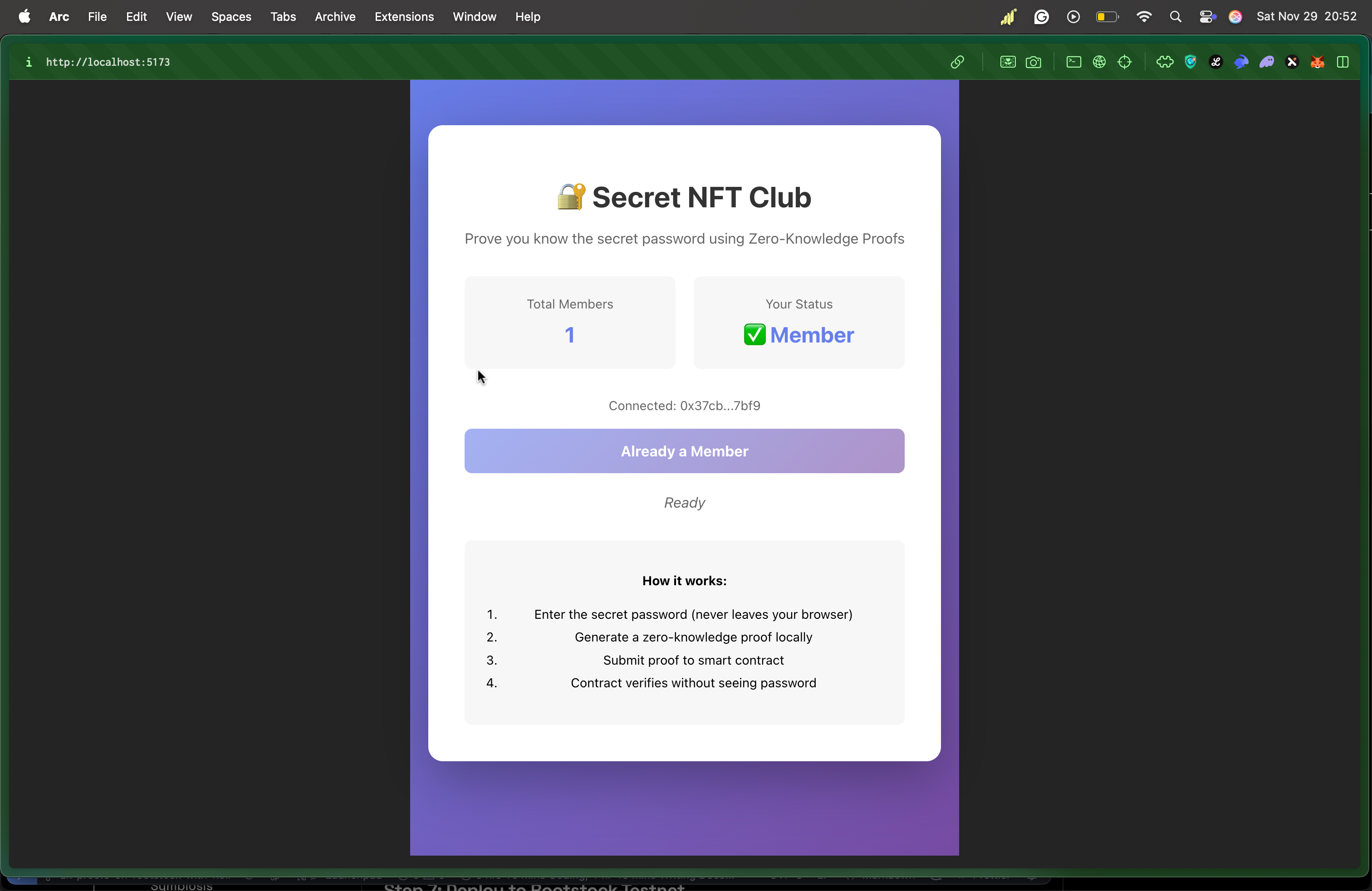
Testing the flow:
- Click "Connect Wallet"
- Click "Join Club (ZK Proof)"
- Enter password:
supersecret2025 - Wait for proof generation (~10-20 seconds first time)
- Confirm MetaMask transaction
- Success! You're now a member
Understanding the Architecture
The Zero-Knowledge Flow
┌─────────────┐    ┌──────────────┐    ┌─────────────┐    ┌──────────────┐
│   User      │───▶│   Browser    │───▶│   Circuit   │───▶│  Blockchain  │
│ (Password)  │    │  (ZK Proof)  │    │ (Verifier)  │    │  (Member ✓)  │
└─────────────┘    └──────────────┘    └─────────────┘    └──────────────┘
      ▲                                                            │
      │                                                            │
      └──────────────── Password NEVER leaves browser ────────────┘
- User Input: Password entered in browser
- Hash Locally: SHA256 → Field element
- Generate Proof: Noir circuit creates ZK proof
- Submit Proof: Only the proof goes on-chain
- Verify: Smart contract verifies math is correct
- Grant Access: User becomes member
Privacy guarantee: Even examining all on-chain data reveals nothing about the password.
Performance Metrics
| Operation | Duration | Gas Cost |
|---|---|---|
| First proof (key download) | 10-20 seconds | - |
| Subsequent proofs | 3-7 seconds | - |
| Verifier deployment | - | ~321,823 |
| Club deployment | - | ~321,823 |
| Join verification | - | ~4,127,651 |
Gas Optimization Tips
- Use
immutablefor constants (saves 2,100 gas per SLOAD) - Custom errors vs require strings (saves ~50 gas)
- Batch operations when possible
- Cache storage reads in memory
Security Best Practices
Circuit Security
✅ Do:
- Audit circuits before production deployment
- Use established hash functions (Pedersen, Poseidon)
- Test edge cases thoroughly
- Document circuit logic clearly
❌ Don't:
- Implement custom cryptography
- Skip constraint checks
- Use unaudited circuits with funds
- Hardcode secrets in circuit
Smart Contract Security
✅ Do:
- Use OpenZeppelin when possible
- Implement access controls
- Add emergency pause mechanism
- Test extensively on testnet
❌ Don't:
- Skip external audits for production
- Allow unbounded loops
- Ignore reentrancy risks
- Deploy without testing
Frontend Security
✅ Do:
- Validate all inputs
- Use HTTPS in production
- Implement rate limiting
- Cache proofs securely in memory
❌ Don't:
- Log sensitive data
- Store secrets in localStorage
- Trust user input blindly
- Skip error handling
Preventing Common Attacks
Front-running: Add nonce or msg.sender binding to circuit
Replay attacks: Include timestamp or chain ID in proof
DoS attacks: Implement rate limiting and gas limits
Secret leakage: Never log the password or intermediate values
Troubleshooting Guide
"Invalid proof" error
Symptoms: Transaction reverts with InvalidProof error
Causes:
- Wrong password entered
- Hash mismatch between circuit and contract
- Corrupt proof data
Solutions:
- Verify SECRET_HASH in deployment.json matches circuit
- Check password spelling
- Regenerate proof
- Verify circuit compilation
Proof generation freezes browser
Symptoms: UI becomes unresponsive during proof generation
Cause: WASM computation blocking main thread
Solution: Use Web Workers (see Advanced section below)
"Out of gas" error
Symptoms: Transaction fails with out of gas
Cause: Gas limit too low for verification
Solution: Increase gas limit manually
const tx = await club.join(proof.proof, {
  gasLimit: 5000000,
});
Advanced Topics
Adding More Complex Proofs
Extend the circuit to prove multiple conditions:
use std::hash::pedersen_hash;

fn main(
    secret: Field,
    age: Field,
    public_hash: pub Field,
    min_age: pub Field
) {
    // Verify secret knowledge
    let computed_hash = pedersen_hash([secret]);
    assert(computed_hash == public_hash);

    // Verify age requirement
    assert(age >= min_age);
}
This proves: "I know the secret AND I'm over 18" without revealing either value.
When adding more complex proofs, always delete the files in your target folder before recompiling. After updating your circuit, run nargo compile and nargo execute to ensure your changes are correctly applied and all artifacts are up to date.
Batch Verification
To verify multiple proofs efficiently, you can add a batchJoin function to your SecretNFTClub.sol contract:
function batchJoin(
    bytes[] calldata proofs,
    address[] calldata members
) external onlyOwner {
    require(proofs.length == members.length, "Length mismatch");

    bytes32[] memory publicInputs = new bytes32[](1);
    publicInputs[0] = secretHash;

    for (uint i = 0; i < proofs.length; i++) {
        require(!hasJoined[members[i]], "Already member");
        require(verifier.verify(proofs[i], publicInputs), "Invalid proof");

        hasJoined[members[i]] = true;
        memberTokenId[members[i]] = _nextTokenId++;

        emit MemberJoined(members[i], _nextTokenId - 1);
    }
}
Testing Your Circuit
Create src/main.test.nr:
use dep::std;

#[test]
fn test_valid_secret() {
    let secret = 0x4c9d6d4e8b8e4c8a5e3b7f2d9c8a6e5b4d3c2a1f9e8d7c6b5a4938271605f4e3d;
    let expected_hash = std::hash::pedersen_hash([secret]);

    // This should pass
    main(secret, expected_hash);
}

#[test]
fn test_invalid_secret() {
    let secret = 0x1234;
    let wrong_hash = 0x5678;

    // This should fail
    main(secret, wrong_hash); // Will panic with assertion failure
}
Run tests:
nargo test
Make sure you are in the root directory of your circuit project (e.g., secret_club) before running the following commands.
Production Deployment Checklist
Before deploying to mainnet, ensure:
Security Audits
- Circuit audited by ZK security firm
- Smart contract audited by Solidity experts
- Frontend security review completed
- Penetration testing performed
Testing
- All unit tests passing
- Integration tests cover all flows
- Load testing completed
Documentation
- Circuit logic fully documented
- API documentation complete
- User guide written
- Emergency procedures documented
Monitoring
- Error logging configured
- Metrics collection setup
- Alert system configured
- Incident response plan ready
Real-World Use Cases
Private Voting Systems
Prove eligibility to vote without revealing identity:
fn main(
    voter_id: Field,
    vote: Field,
    eligible_root: pub Field
) {
    // Prove voter_id is in Merkle tree of eligible voters
    // Without revealing which voter or their vote
}
Anonymous Credentials
Prove you have a credential without revealing details:
fn main(
    credential_hash: Field,
    age: Field,
    country: Field,
    issuer_signature: Field,
    public_requirements: pub Field
) {
    // Prove: "I have a valid credential from trusted issuer"
    // "My age > 18 and I'm from allowed countries"
    // Without revealing actual age or country
}
Private DeFi
Prove solvency without revealing portfolio:
fn main(
    asset_balances: [Field; 10],
    total_value: pub Field
) {
    let sum = calculate_total(asset_balances);
    assert(sum >= total_value);
    // Proves: "My portfolio value is at least X"
    // Without revealing individual holdings
}
Compliance-Friendly Privacy
Prove compliance without revealing transaction details:
fn main(
    amount: Field,
    recipient_country: Field,
    sender_status: Field,
    max_amount: pub Field,
    blocked_countries: pub [Field; 5]
) {
    // Prove amount is under limit
    assert(amount <= max_amount);

    // Prove recipient not in blocked countries
    for i in 0..5 {
        assert(recipient_country != blocked_countries[i]);
    }

    // Prove sender is KYC verified
    assert(sender_status == 1);
}
Extending the Project
Add NFT Metadata
Extend the contract to include actual NFT functionality:
import "@openzeppelin/contracts/token/ERC721/extensions/ERC721URIStorage.sol";

contract SecretNFTClub is ERC721URIStorage {
    // ... existing code ...

    function join(bytes calldata proof) external {
        if (hasJoined[msg.sender]) revert AlreadyMember();

        bytes32[] memory publicInputs = new bytes32[](1);
        publicInputs[0] = secretHash;

        if (!verifier.verify(proof, publicInputs)) revert InvalidProof();

        uint256 tokenId = _nextTokenId++;
        hasJoined[msg.sender] = true;

        _safeMint(msg.sender, tokenId);
        _setTokenURI(tokenId, generateMetadata(tokenId));

        emit MemberJoined(msg.sender, tokenId);
    }

    function generateMetadata(uint256 tokenId) private pure returns (string memory) {
        return string(abi.encodePacked(
            "ipfs://Qm.../",
            Strings.toString(tokenId),
            ".json"
        ));
    }
}
Add Tiered Membership
Different secrets for different tiers:
enum Tier { Bronze, Silver, Gold }

mapping(bytes32 => Tier) public secretTiers;
mapping(address => Tier) public memberTier;

constructor(
    bytes32[] memory _secretHashes,
    Tier[] memory _tiers,
    address _verifier
) ERC721("Secret Club", "SCLUB") {
    verifier = UltraVerifier(_verifier);

    for (uint i = 0; i < _secretHashes.length; i++) {
        secretTiers[_secretHashes[i]] = _tiers[i];
    }
}

function join(bytes calldata proof, bytes32 secretHash) external {
    require(!hasJoined[msg.sender], "Already member");
    require(secretTiers[secretHash] != Tier(0), "Invalid tier");

    bytes32[] memory publicInputs = new bytes32[](1);
    publicInputs[0] = secretHash;

    require(verifier.verify(proof, publicInputs), "Invalid proof");

    memberTier[msg.sender] = secretTiers[secretHash];
    hasJoined[msg.sender] = true;

    _safeMint(msg.sender, _nextTokenId++);
}
Add Secret Rotation
Allow updating the secret periodically:
bytes32 public secretHash;
uint256 public lastRotation;
uint256 public constant ROTATION_PERIOD = 30 days;

function rotateSecret(bytes32 newHash) external onlyOwner {
    require(
        block.timestamp >= lastRotation + ROTATION_PERIOD,
        "Too soon"
    );

    secretHash = newHash;
    lastRotation = block.timestamp;

    emit SecretRotated(newHash, block.timestamp);
}
Resources & Community
Official Documentation
- Noir Language: https://noir-lang.org/docs
- Noir Examples: https://github.com/noir-lang/noir-examples
- Barretenberg: https://github.com/AztecProtocol/barretenberg
Rootstock Resources
- Developer Portal: https://dev.rootstock.io
- Testnet Faucet: https://faucet.rootstock.io
- Block Explorer: https://explorer.testnet.rootstock.io
- Discord Community: https://discord.gg/rootstock
Learning Resources
- ZK Whiteboard Sessions: https://zkhack.dev/whiteboard
- ZK Learning Resources: https://zkp.science
- Cryptography Course: https://www.coursera.org/learn/crypto
Tools & Libraries
- Hardhat: https://hardhat.org
- Vite: https://vitejs.dev
- Ethers.js: https://docs.ethers.org
Getting Help
- Noir Discord: https://discord.gg/aztec
- Rootstock Discord: https://discord.gg/rootstock
- Stack Overflow: Tag questions with
noir-langorrootstock
Conclusion
You've now built a complete privacy-preserving membership system using:
✅ Zero-Knowledge Proofs - Prove knowledge without revelation
✅ Noir Language - Developer-friendly ZK circuit development
✅ Rootstock Blockchain - Bitcoin-secured smart contracts
✅ Modern Web Stack - React + Vite + Ethers.js
What you've learned:
- Creating ZK circuits with Noir
- Generating and verifying proofs
- Deploying to Rootstock
- Building privacy-focused dApps
- Integrating ZK proofs in frontends
Next steps:
- Deploy to Rootstock Mainnet
- Add more complex verification logic
- Build a production-ready UI
- Implement additional privacy features
- Join the ZK community and contribute!
The future of blockchain privacy is here, and you're now equipped to build it. The password never appears on-chain, in logs, or anywhere—true zero-knowledge privacy powered by Bitcoin security.
You made it this far 🥹🫂, Thank you so much. Happy hacking! 🎉🔐