How to Read a Transaction in the Rootstock Explorer
This guide explains what a blockchain transaction is, how transactions work on Rootstock, and how to find and read a transaction in the Rootstock Explorer Testnet or Rootstock Explorer Mainnet. After reading it, you will know how to interpret the main fields on a transaction page and tell the difference between a simple transfer and a smart contract interaction.
What Is a Blockchain Transaction?
A transaction is a signed instruction that moves value or triggers a change on the blockchain. On Rootstock, that can mean sending rBTC from one address to another or calling a smart contract (for example, to transfer a token or run a function). Each transaction is recorded on the public ledger, and once it is included in a block, it cannot be changed or removed.
How Transactions Work on Rootstock
When you send rBTC or interact with a contract from your wallet, you create a transaction. Your wallet signs it and broadcasts it to the network. Miners pick it up, run it, and include it in a block. The block is then appended to the chain. Rootstock is EVM-compatible, so the flow is similar to Ethereum: you pay gas (in rBTC) for the work the network does to process your transaction. The higher the gas price you set, the more likely miners are to include your transaction quickly when the network is busy.
Finding a Transaction in the Rootstock Explorer
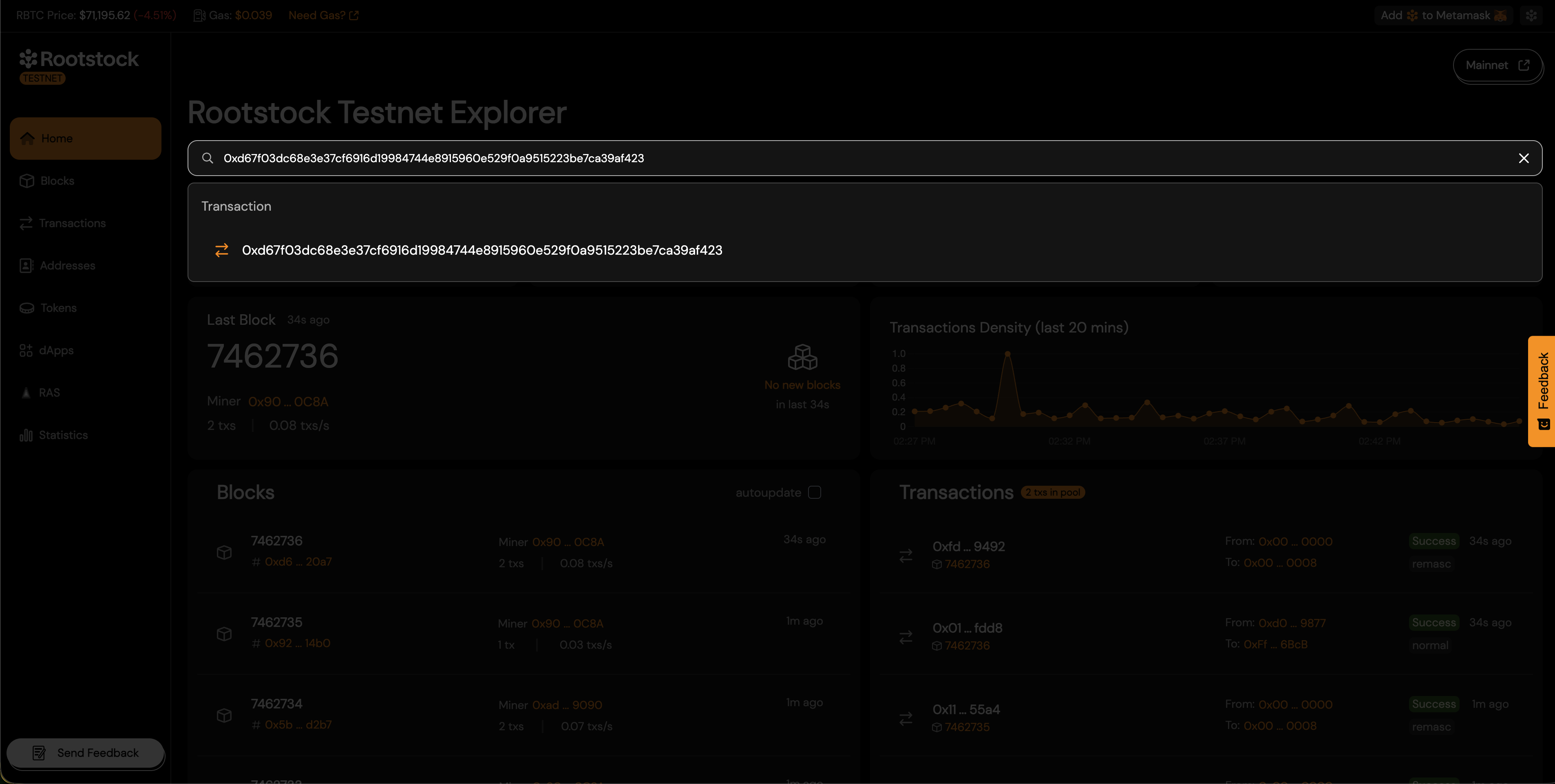
Type the transaction hash in the search box at the top of the Rootstock Explorer. The explorer accepts a full hash (a long hex string starting with 0x). It redirects you to the transaction detail page.
Main Fields on a Transaction Page
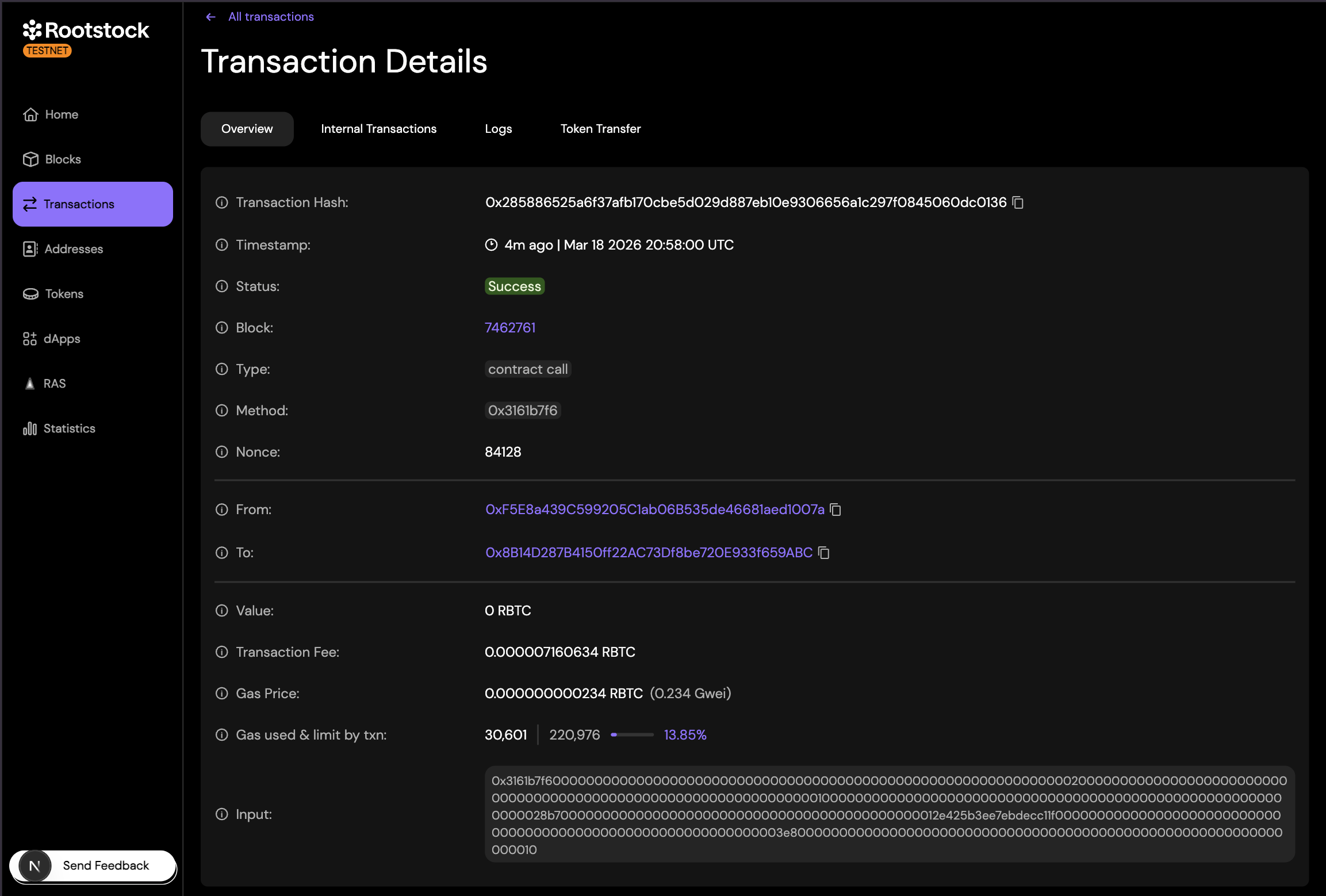
On the transaction detail page, the Overview tab shows the main fields. The exact layout may vary slightly between mainnet and testnet. Other tabs (Internal Transactions, Logs, Token Transfer) show derived data such as internal calls, events, and token movements.
Transaction Hash
The transaction hash (also called transaction ID or txhash) is a unique identifier for the transaction. It is a 66-character hex string (including the 0x prefix). You use this value to look up the transaction on any block explorer or in APIs. Keep it if you need to prove that a transfer or contract call happened. Use the copy icon next to the hash to copy it.
Timestamp
The timestamp shows when the block that contains this transaction was produced. The explorer may show a relative time (e.g. "1m ago") and the exact date and time in UTC. This is when the transaction was confirmed on-chain.
Status
The status indicates whether the transaction was executed successfully.
- Success: (green) means execution completed.
- Failed: (often shown in red) means the transaction was included in a block but reverted, for example due to a revert in a smart contract or insufficient gas. The sender still pays the transaction fee.
- Pending: transactions are not yet in a block and may still be dropped or replaced.
Block
The block number is the height of the block that contains this transaction. It tells you where the transaction sits in the chain. Click the block number to open that block’s page and see other transactions in the same block.
Type
The type classifies the transaction. The explorer may show one of the following:
- Normal: Simple transfer of cryptocurrency between two addresses. No smart contract interaction, just moves funds.
- Remasc: Special Rootstock transaction that distributes mining rewards and fees. Automatically handled by the network.
- Bridge: Transfers assets between different blockchains. Locks tokens on one chain and releases or mints them on another.
- Contract deploy: Creates a new smart contract on the blockchain. The transaction contains code that becomes a program at a new address.
- Contract call: Interacts with an existing smart contract. Executes functions to read or modify data.
Method
The method is the specific function being called inside the smart contract. It tells the contract what action to execute (e.g. transfer, approve, swap). In raw form it appears as the function selector: the first four bytes (eight hex characters after 0x) of the keccak256 hash of the function signature (e.g. 0x3161b7f6). When the contract is verified, the explorer may show the decoded function name and arguments instead of or in addition to this hex value.
Nonce
The nonce is a counter for the "From" address. Each transaction from that address uses a nonce one higher than the previous one. Nonces ensure order and prevent replay: the network accepts only one transaction per nonce per address. You can use the nonce to see the sequence of transactions sent from the same wallet.
From
From is the address that signed and sent the transaction (your wallet or the contract that initiated the call). The explorer links this address so you can open its page and see balance, history, and (if it is a contract) code and read/write functions.
To
To is the destination address of the transaction. It can be a wallet (for transfers) or a contract (for interactions).
Value
Value is the amount of rBTC sent in the transaction (the value field). For a simple transfer, it is the amount the sender paid to the "To" address. For a contract call, it can be 0 rBTC (no rBTC sent) or the rBTC sent along with the call (e.g. when depositing into a contract).
Transaction Fee
The transaction fee is the amount of rBTC paid to the network to process and include a transaction in a block. It is calculated as: gas used × gas price.
The fee depends on how much computation the transaction requires (gas used) and the price per unit of gas (gas price). This cost is always paid by the sender ("From" address), in addition to any value transferred.
Gas Price
Gas price is the price per unit of gas for this transaction. The explorer may show it in rBTC and in Gwei (e.g. 0.03127872 Gwei). Miners use gas price to prioritize transactions when the network is busy. A higher gas price usually means faster inclusion.
Gas used & limit by txn
This line shows gas used (e.g. 30,589) and gas limit (e.g. 220,976). The gas limit is the maximum gas the sender allowed for the transaction. The network will not use more than this. Gas used is the amount actually consumed. The percentage (e.g. 13.84%) is used ÷ limit. Unused gas is not charged. If execution had needed more than the limit, the transaction would have failed (out of gas).
Input
The raw data sent to the "To" address.
For simple rBTC transfers, it is empty (0x). For smart contract interactions, it contains the function being called (method selector) and its parameters, encoded in hexadecimal.
If the contract is verified, the explorer may show a decoded, human-readable version.
Simple Transfers vs Smart Contract Interactions
Simple transfer:
A transaction that sends rBTC from one externally owned address (EOA) to another.
The "To" field is a wallet address, the "Value" is the amount transferred, and the "Input data" is typically empty. The main cost is the transaction fee (gas).
Smart contract interaction:
A transaction where the "To" address is a smart contract.
It may send 0 or some rBTC and includes input data that encodes a function call. The contract executes code (e.g., transferring tokens, swapping, staking). Gas usage is usually higher, and the transaction may fail (revert) depending on the contract logic. Token transfers (e.g., ERC-20) appear as contract interactions, where the "Value" may be 0 and the actual transfer is recorded in events/logs.
Key Differences
| Feature | Simple Transfer | Smart Contract Interaction |
|---|---|---|
| Purpose | Send rBTC | Execute contract logic |
| Input Data | Empty | Contains method + params |
| Complexity | Low | Higher |
| Gas Usage | Lower | Usually higher |
Example: Reading a Transaction in the Explorer
The screenshot below shows a real transaction on the Rootstock Testnet explorer. Walking through it shows how the Overview fields describe a simple rBTC transfer.
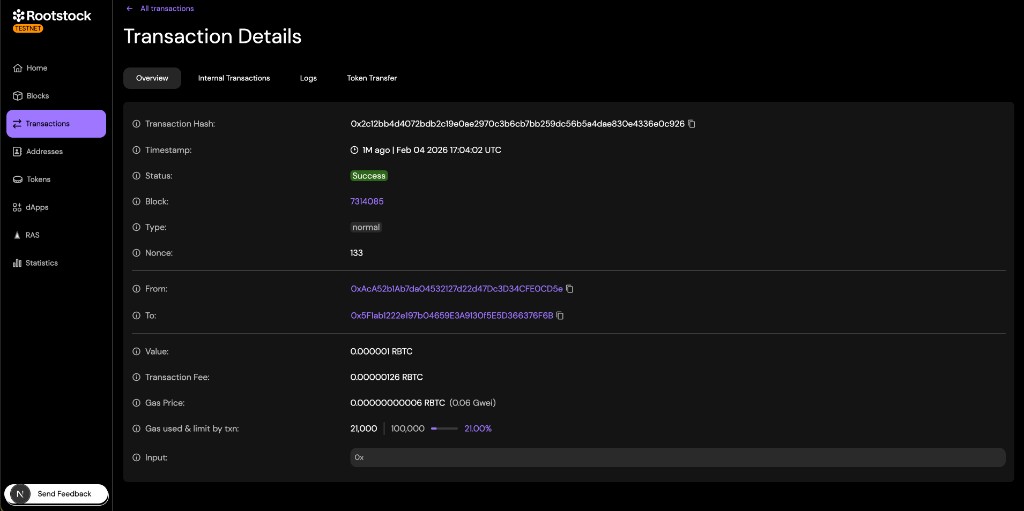
- Status is Success, so the transaction was included in a block and executed correctly.
- Type is normal. That means no smart contract was involved. This is a direct transfer of rBTC from one address to another.
- Block is 7314085. Click it to see other transactions in the same block.
- Nonce is 133. It is the 134th transaction sent from the From address (nonces start at 0).
- From is the sender’s address (
0xAcA5...0CD5e). To is the recipient’s address (0x5F1a...76F6B). Both are externally owned addresses (wallets), not contracts. - Value is 0.000001 rBTC. That is the amount of rBTC sent from From to To.
- Transaction fee is 0.00000126 rBTC. The sender paid this to the network in addition to the 0.000001 rBTC sent to the recipient.
- Gas price is 0.06 Gwei. Gas used & limit by txn is 21,000 out of 100,000 (21%). A simple transfer always uses 21,000 gas on Rootstock. The sender set a limit of 100,000. The unused gas was not charged.
- Input is
0x. Empty input confirms there was no contract call. Only rBTC was moved.